
Front Desk, Bar and Lobby Hardware for Hotels and Resorts
A hotel runs three hardware environments at once: a front desk that cannot go down, guest-facing screens that have to look right, and back-of-house stations that nobody photographs. DcaPOS builds all three to the same brand standard.
What hospitality hardware has to survive
Hotel systems are judged differently from retail ones. Nobody notices a well-specified front desk; everybody notices a check-in queue, a logo rendered in the wrong blue, or a lobby screen showing a Windows update prompt.
A desk that never closes
Check-in runs from the early flight to the late arrival, so the terminal has no maintenance window. That rules out anything with a fan in a carpeted lobby and argues for a fanless, passively cooled unit with a documented duty cycle rather than a consumer all-in-one.
Guest-facing presentation
The front desk is the only place a guest sees your hardware at close range. Housing colour, bezel width, logo placement and the boot screen are brand decisions, not hardware decisions. We treat them that way.
Peripherals that must be present
Card readers, key encoders and passport scanners all attach to the desk machine. If the terminal has no native serial port, every one of them becomes a USB adapter that fails at the wrong moment. Native RS-232 on the desk unit is worth paying for.
Lobby and wayfinding screens
Signage runs 16 hours a day in a bright, dusty lobby. Panel brightness, an anti-glare surface and a player that reboots itself after a power cut matter more than resolution. A mini PC behind the panel is easier to service than a smart display with a proprietary OS.
Station by station
The split below covers a 120-room city hotel as well as a resort with several outlets.
| Station | What we specify | Why |
|---|---|---|
| Front desk | 15.6-inch Windows terminal with native RS-232, card reader, 80 mm printer, cash drawer | PMS integrations still expect serial peripherals and a Windows driver stack. |
| Concierge / wayfinding | Floor-standing kiosk, 23.8 to 32-inch, 10-point touch | Maps, services and check-in queues handled away from the desk. |
| Lobby and lift lobby signage | 43 to 55-inch commercial panel driven by a fanless mini PC | A separate player means a failed screen is a screen swap, not a full unit replacement. |
| Bar and restaurant | 15.6-inch Android terminal with built-in printer, handhelds for terrace service | Outlet staff should not queue at the front desk to ring a drink. |
| Housekeeping and stores | Handheld PDA with 2D scan, 58 mm mobile printer | Linen counts, minibar and maintenance tickets logged where the work happens. |
Hardware we build for this sector
Every unit below is a current production model with its own specification page. Housing, memory, screen size and interfaces are configured per order.
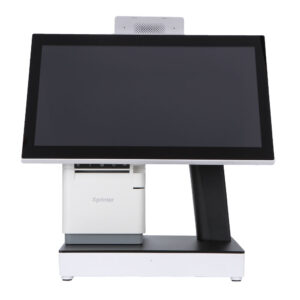
DCA-Q3
15.6-inch Windows desk terminal, J6412 to Core i5, native RS-232 for PMS peripherals.
View specifications →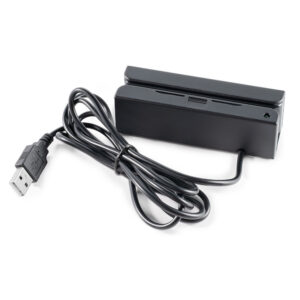
Magnetic Card Reader MSR105X
Track 1/2/3 reader for front-desk card capture and key systems.
View specifications →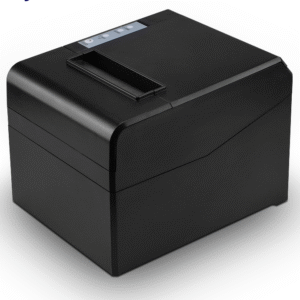
80mm Receipt Printer POS-8330
Fast, quiet 80 mm printer for folios and registration cards.
View specifications →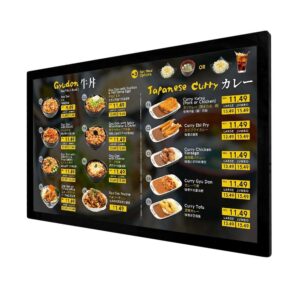
Digital Menu Board
Commercial signage panel for lobby promotions and outlet menus.
View specifications →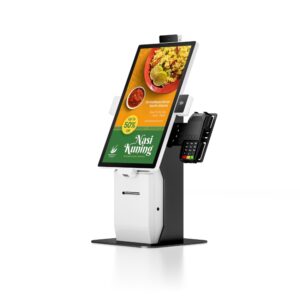
Self Service Kiosk R Series
Modular wayfinding and check-in kiosk, 23.8 to 32-inch.
View specifications →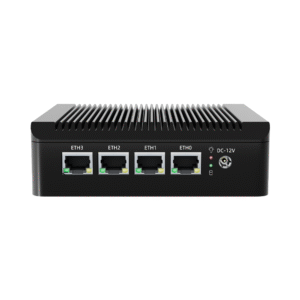
Industrial Mini PC DCA-M200
Four-port 2.5 GbE fanless player for signage and back-office tasks.
View specifications →More models for this sector
The other 34 models we build for hotel and hospitality, filed by hardware family. All are in current production, and housing, memory, screen size and interfaces are set per order.
Browse the full range: Windows POS, Peripherals · all POS hardware
What we customise
Hospitality projects usually turn on presentation and serviceability rather than raw specification.
Brand-standard finishes
Housing colour matched to the property or chain brand guide, including white and champagne finishes, plus logo etching and a custom boot animation.
Guest-facing screens
Welcome screen, logo loop and language set pre-loaded on the terminal or player, so the unit looks finished the moment it is unboxed.
Serviceability
Front-access service doors on kiosks, VESA patterns documented per site, and a spares kit held for the property rather than shipped per incident.
Multi-property rollouts
Serialised cartons per property, one BOM revision for the group, and consolidated shipping to a single receiving address.
Frequently asked questions
The questions buyers ask before they place a first order.
Will the terminal work with our property management system?
If your PMS runs on Windows and talks to peripherals over serial or OPOS, the DCA-Q3 is the right desk unit: J6412 up to Core i5 with native RS-232, so card readers and key encoders do not need USB adapters. For PMS deployments that are browser-based, an Android terminal is enough and cheaper to run.
Can the housing match our brand colour?
Yes, within the limits of the process. Powder coat and plastic parts can be matched to a Pantone reference, and we will send a physical sample for sign-off before the production run. Very light or metallic finishes may need a different substrate; we will say so at quotation rather than after tooling.
What happens to a lobby screen after a power cut?
The player is configured to auto-power-on and relaunch the signage application, with the OS set to resume rather than wait at a login prompt. We test the power-cycle behaviour before shipping because it is the single most common failure mode in a lobby installation.
Do you supply the signage software?
We supply the panel, the player and the mounting hardware. Content management is normally your existing CMS or our partner’s; the player is a standard Windows or Android device, so any CMS with a player app will run on it.
How do you handle a multi-property rollout?
One BOM revision, per-property packing lists and serialised cartons, shipped consolidated to a central receiving point or direct to each property. Spares are sized to the number of desks and outlets, and held locally so a failed unit is a swap on the same day.
Planning a refurbishment or a new property?
Send the outlet list, the PMS you run and the brand guide. We will come back with a hardware schedule per area.
Send your requirements
