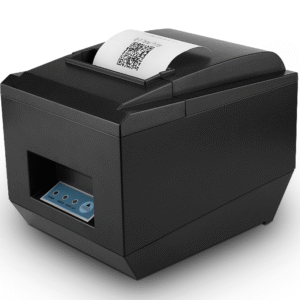
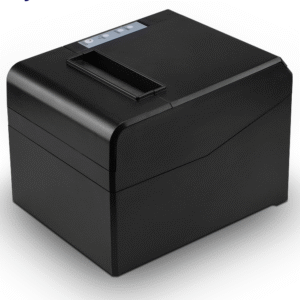
A Receipt Printer That Can Also Print a Coupon
Most 80 mm printers in this class are interchangeable on paper: same roll, same ESC/POS command set, same 72 mm print width. The POS-8370 earns its place on three things the others do not publish — a stored logo that prints without being sent, a cutter rated for 1.5 million cuts, and native 1D barcode printing on the receipt path.
Together those turn the receipt from a record of the transaction into a piece of paper that can do work: a voucher with a barcode the customer brings back, a loyalty slip the till can scan, a coupon with a scannable code instead of a handwritten reference.
Stored Logo: The Time You Get Back Per Receipt
Every receipt in this range can print a logo. The difference is where the logo lives.
On a printer without stored-image support, the POS software sends the logo as a bitmap with every print job. On a 512-dot line a small logo is a few kilobytes, which does not sound like much until it is multiplied by the number of receipts and added to the data that has to cross USB or the network before the first line of the receipt can start printing. The NV logo feature stores the image in the printer’s non-volatile memory, and the print template calls it with a single command.
What that buys in practice:
- Faster first line. The receipt starts printing sooner because there is no image to transfer first. On a Bluetooth connection, where throughput is the bottleneck, the difference is noticeable.
- Consistent output. The logo is rendered by the printer, so it looks the same whether the job came from Windows, Android or Linux — no dependency on how each driver handles the image.
- Survives a reinstall. The stored image is in the printer, so replacing the POS software or the terminal does not change how the receipt looks.
The practical catch: the stored image is fixed. Changing the logo means re-downloading it to every printer in the fleet with a tool, which is a one-time inconvenience rather than a recurring one. If your branding changes often, sending the bitmap may be simpler.
1.5 Million Cuts: The Number That Sets Your Maintenance Schedule
The auto cutter is the part of an 80 mm printer that fails first, and almost nobody specifies it. A cutter rated for 1.5 million cuts at 400 receipts a day works out to about 3,750 days — over ten years of operation before the rating is reached. The 100 km print head at the same volume gives roughly four years.
Which means the maintenance conversation inverts. The head becomes the consumable and the cutter becomes a lifetime part. That is a useful thing to know when you are writing a service contract, because it tells you what to stock: print heads and platens, not cutter assemblies.
The cutter does full or partial cut. Partial leaves a tab so the receipt stays attached — the right setting for a printer mounted above a counter, where a loose receipt falls on the floor. Full cut is cleaner for a receipt handed over immediately, and it is what you want if the paper feeds into a bagging area.
Barcode Printing on the Receipt Path
The POS-8370 prints 1D barcodes natively: UPC-A, UPC-E, EAN-13, EAN-8, CODE39, ITF and CODABAR. The printer generates the symbol from the data, at the correct bar widths for the symbology, rather than printing an image of a barcode.
That distinction matters, and it is the reason a lot of “our barcode will not scan” problems exist. A barcode sent as a bitmap is at the mercy of the dithering mode and the print density: bars that should be 0.25 mm wide come out at 0.2 mm or 0.3 mm depending on how the image was converted, and a scanner reads them intermittently. A natively generated symbol is exact.
Three uses this unlocks:
- Coupons and vouchers. Print a per-transaction code that can be scanned at the next visit. The alternative — a human typing a reference number — is where redemption rates go to die.
- Order and table references. A barcode on a kitchen ticket that the expediter scans to mark the order ready, instead of reading a number off the paper.
- Returns and receipts-as-records. A receipt barcode lets a return be processed by scanning the original slip rather than looking up a transaction.
2D symbologies — QR and Data Matrix — are not in the native list. For a QR code, either the POS generates the image or you use a printer with 2D support. If QR on the receipt is a hard requirement, say so at quotation stage rather than discovering the limit after the pilot.
USB, LAN, Bluetooth — a Wireless-First Interface Set
The interface set on this model is USB, Ethernet and Bluetooth as an option. There is no serial and no parallel port, which rules out legacy Windows POS software that expects a COM or LPT port — check your software’s port type before ordering, because that is the most common order error in this category.
What the set does cover is the deployment that is becoming the default: a printer on the network for kitchen and multi-station printing, USB for a single till, Bluetooth for a tablet or handheld that moves.
Two field notes on the wireless side:
- Bluetooth throughput sets the ceiling. A receipt with a large logo sent as a bitmap over Bluetooth is slow; the stored-logo feature exists partly to fix that. Keep the receipt template lean.
- 2.4 GHz congestion is real. A room with dozens of devices — handsets, tablets, headsets, Wi-Fi — is where Bluetooth drops. For a fixed till, wired is better.
The Drawer Port, and the 24 V Detail
The drawer kick-out port on this model is specified at DC 24 V / 1 A, driven by an ESC/POS command. This is worth flagging explicitly because drawer voltage is where installations fail silently across the whole category.
Cash drawer solenoids are made in both 12 V and 24 V versions, and the connector is an RJ11 either way. Put a 12 V drawer on a 24 V port and the solenoid burns; put a 24 V drawer on a 12 V port and it will not pull in, so the drawer stays shut and the cashier assumes the printer is broken. Before wiring, check the drawer’s rated voltage against the printer’s specified port — not the shape of the connector.
The drawers in this range are the POS-410A, POS-410B, POS-405A and POS-350A. Tell us which one you are using and we will confirm the pairing.
Paper Path and Environment
79.5 ± 0.5 mm rolls up to 83 mm diameter, 0.06–0.08 mm thick, 72 mm print width, 512-dot line at 203 dpi. Standard 80 mm geometry, so existing templates render without re-layout.
Power is a 110/220 V input adapter with DC 24 V / 2.5 A output. Operating temperature at the working range of this class — fine on a counter, not in an unventilated kitchen corner above a heat source, where thermal paper curls and darkens regardless of the printer. The unit is 17.47 × 14.17 × 12.23 cm and ships one per box, twelve boxes per carton.
220 mm/s print speed, which is enough for a single till and for most counter formats. Where it becomes visible is high-rate kitchen printing: above roughly 600 receipts or tickets a day per station, the 260 mm/s models in the range are worth the difference.
Where the POS-8370 Fits
- Retail with coupons or loyalty. The native barcode plus stored logo is the combination that makes a printed voucher work.
- Wireless tablet and handheld deployments. Bluetooth, with a stored logo so the print job stays small.
- Multi-station sites on a LAN. One unit per station, addressed by IP.
- Not for legacy serial or parallel software. No serial, no parallel — take a 260 mm/s unit from the range instead.
- Not for labels or 2D codes. Continuous receipt roll and 1D symbologies only. Labels need POS-9210 or POS-9250; QR needs a different model.
The Other 80 mm Models
- POS-8250 — 260 mm/s, widest interface set including serial and parallel, standard desk chassis.
- POS-8220 — 260 mm/s in a heavy sealed chassis for kitchen and wet environments.
- POS-8330 — 260 mm/s, wall-mountable, Linux, four dithering modes for graphic output.
- POS-8360 — 220 mm/s, 0.72 kg, USB/LAN/Bluetooth, twelve to a carton.
Frequently Asked Questions
Can it print a QR code?
Not as a native 2D symbology. QR is printed as an image generated by the POS software, which works but depends on print density and paper quality. If QR on the receipt is a requirement, tell us at quotation stage.
Does the stored logo survive a power cycle?
Yes. The logo is written to non-volatile memory and stays until it is overwritten, so it survives power cycles, firmware resets of the host and a swap of the POS software. Keep the image small — the stored region is shared with font and configuration data.
How long will the cutter last?
Rated at 1.5 million cuts. At 400 receipts a day that is over ten years of operation — the print head (100 km) will need replacing first.
Will it work with an Android POS?
Yes, over USB, network or Bluetooth, using the ESC/POS command set that Android POS SDKs expect. Check which interfaces your specific SDK implements.
Can it drive a cash drawer?
Yes, through the DC 24 V / 1 A drawer port. Confirm your drawer’s solenoid voltage matches before wiring — a mismatch either burns the solenoid or leaves the drawer shut.
What is the warranty?
12 months minimum, 100 km rated print head. Extended terms available for OEM and chain programmes.
Next step: tell us the receipt template (logo size, whether a barcode or voucher code prints), the host platform and the drawer model — we will confirm the configuration and quote factory-direct. Email sales@dcapos.com or contact us.
Related: thermal receipt printers · POS-8250 80 mm printer · POS-410A cash drawer · POS peripherals
| Specifications |
|
Print Method |
Direct Line Thermal |
|
Interfaces |
USB / LAN / Bluetooth (optional) |
|
Print Comand |
ESC / POS command |
|
Print Speed |
220mm/s |
|
Resolution |
203DPI (8dot/mm) |
|
TPH Reliability |
100km |
|
Auto Cutter |
Full / Partial |
|
Cutter Life |
1.5 million cuts |
|
NV Logo |
support downloading and printing logo |
|
Line Spacing |
3.75mm (Adjustable by commands) |
|
Extension Character Sheet |
PC437(Standard Europe)、Katakana、PC850(Multilingual)、PC860(Portuguese)、PC863(Canadian)、PC865(Nordic)、West Europe、Greek、Hebrew、East Europe、Iran、WPC1252、PC866(Cyrillic#2)、PC852(Latin2)、PC858、IranII、Latvian、Arabic、Thai、PT151(1251) |
|
Character Size |
ANK,Font A:1.5×3.0mm(12×24 dots) Font B:1.1×2.1mm(9×17 dots) Chinese,Traditional Chinese:3.0×3.0mm(24×24 dots) |
|
Supported Code |
1D: UPC-A / UPC-E / JAN13 (EAN13) / JAN8 (EAN8) / CODE39 / ITF / CODABAR / CODE93 / CODE128 2D: QR CODE, PDF417 |
|
Paper |
|
Thermal Paper Types |
Thermal Roll Paper |
|
Max Diameter of paper roll |
83MM |
|
Max Paper Width |
79.5±0.5mm |
|
Paper Thickness |
0.06-0.08 mm |
|
Electrical |
|
Power Adapter |
Input:AC 110V/220V, 50~60Hz ; Output:DC 24V/2.5A |
|
Cash Drawer |
DC 24V/1A |
|
Package |
|
Printer Dimension |
17.47*14.17*12.23 CM |
|
Package |
1pc with accessories/Box, 12 boxes/CTN |
|
Accessories |
Manual, USB Cable, Power Adapter, Paper Roll |
|
CTN Dimension |
61.4*38.8*29.8 CM |