If you want more information of our industry and products,please contact us.
Get to Know Us Now
|
Model
|
DCA-Q
|
|
Optional Colors
|
White
|
|
CPU
|
J1900 , Core I3 , CORE I5, CORE I7
|
|
Memory Support
|
8GB Optional 4GB, 8GB 16GB DDR4
|
|
Hard Driver
|
SSD 256GB Optional:64GB (default), SSD 128GB, 256GB HDD 500GB, 1T optional
|
|
LCD panel Size
|
23.8 inch optional : 21.5/24/27/32 inch FHD LCD panel
|
|
Contrast ratio
|
1500:1
|
|
Visual Angle
|
89/89/89/89 (Typ.)(CR≥10)
|
|
Reaction time
|
5ms
|
|
Panel life
|
For 50,000 hours
|
|
Brightness
|
300cd/m2
|
|
Resolution
|
1920*1080 2K 16:9
|
|
Touch Screen
|
10 points projected capacitive touch panel
|
|
Material
|
Metal shell+tempered glass
|
|
Surface
|
Spray paint
|
|
Antenna
|
builded in
|
|
Install way
|
wall mount
|
|
Height
|
Adjustable
|
|
I/O interface
|
USB*4
|
|
LAN: RJ45*1
|
|
|
POWER interface*1
|
|
|
WIFI
|
|
|
Operating temperature
|
0 to 50°C
|
|
Storage temperature
|
-10 to 60°C
|
|
Warranty
|
One year
|
|
Weight
|
NET: 13KG Gross :15kg
|
|
Carton size
|
87.5*19.5*42.5cm
|
|
Operating system
|
Win 10 opentional: Windows 7/8/10, Ubuntu, Linux
|
|
Power adapter
|
DC:12V-8A AC:110V-220V
|
|
Barcode scanner
|
2D barcode scanner(can read 1d and 2d barcode both)
Cmos: 640×480 CMOS 120FPS 1D barcode: Interleaved 2 of 5, ISBN, Code 93, Code 11,UCC/EAN-128 GS1 Databar, Matrix 2 of 5, Industrial 2 of 5,Code 128, EAN-13, EAN-8, Code 39, UPC-A, UPC-E, Codabar,Standard 2 of 5, MSI-Plessey,GS1 composite code 2D barcode:PDF417, Data Matrix, QR Code Voltage and currenct: 5V 260mA Reading accuracy: 4mil barcode |
|
Pirnter
|
80MM thermal receipt printer with auto cutter max printing speed 150mm/s
58mm and 80mm paper both ok working life of printing:50KM Paper loading: loading in front Dpi:203PDI |
|
Space for POS machine
|
Yes
|
|
Camera
|
Optional
Pixel: 2 megapixels 1920*1080fhd Output format:YUV/MJPEG.H.264 camera white balance:automatic |
|
Mobile communication module
|
Optional
frequency band:FDD LTE: B1/B3/B8 TDD LTE: B38/B39/B40/B41 TDSCDMA: B34/B39 WCDMA: B1/B8CDMA 1x/EVDO: BC0GSM: 900/1800 |
|
Card reader
|
Optional IC/ID card reader
|


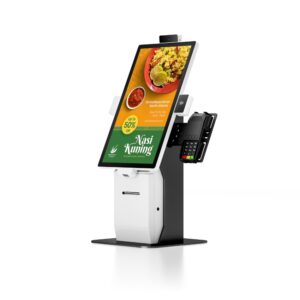
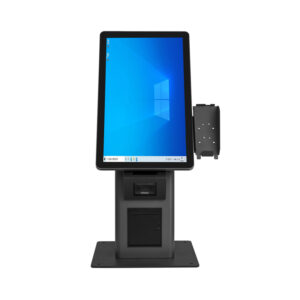
The Q Series is a 23.8-inch wall-mounted self-ordering kiosk for quick-service restaurants, fast-casual chains, coffee shops and convenience retail. It is built around a single constraint that decides whether self-ordering works or becomes an expensive ornament: the guest must be able to order faster than they could at the counter, including on the first attempt, without staff help.
That requirement drives every engineering choice here — a 10-point projected capacitive panel that responds to a greasy fingertip, a tempered-glass front that survives a dropped tray, an adjustable wall bracket that puts the screen at the right height for both a standing adult and a child, and a configuration range wide enough to run a static menu board or a full animated ordering interface on the same chassis.
Quick-service and fast-casual counters. The kiosk absorbs the order-taking load at peak, so the same headcount handles more covers. Placement matters more than people expect: mounted at the end of the queue rather than behind the till, it shortens the perceived wait before the guest has even decided.
Coffee and bakery formats. High-frequency, small-basket orders are where self-ordering pays back fastest — the interaction is short, the menu is stable, and upselling prompts (extra shot, larger size, pastry) work reliably on screen.
Convenience and grab-and-go retail. With a scanner and payment terminal fitted, the Q Series doubles as a self-checkout point for small baskets, which keeps the manned till free for age-restricted and assisted transactions.
Food courts and multi-brand sites. One kiosk can present several menus, so a shared seating area serves multiple concessions without a dedicated counter for each.
The Q Series is a platform, not a fixed SKU. Three decisions shape the unit you receive:
1. Processor — match it to the interface, not to the brochure. The J1900 is genuinely sufficient for a static or lightly animated menu with a straightforward ordering flow. Step up to Core i3 or i5 when the interface carries video, high-resolution food photography transitions, or runs alongside a browser-based ordering stack and an advertising player. Core i7 is available for sites running heavier local rendering or multiple simultaneous content layers. Over-specifying wastes budget; under-specifying shows up as lag exactly when the queue is longest.
2. Screen size. 23.8-inch 1920×1080 is the default and the right answer for most single-column ordering flows. 21.5-inch suits tighter footprints and counter-adjacent mounting; 24, 27 and 32-inch panels suit menu-led layouts where the guest browses categories visually, and 32-inch works well where two guests order together at one station.
3. Memory and storage. 4GB DDR4 with a 64GB SSD covers a thin-client setup that streams menu content. 8GB with 128–256GB is the safer default when content is cached locally, because a kiosk that keeps working through a brief network interruption is worth more than the price difference. 16GB and 500GB–1TB HDD options exist for sites holding large local media libraries.
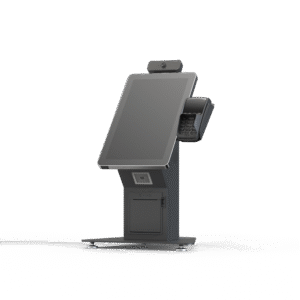
The Q Series is wall-mounted with an adjustable-height bracket, which solves the most common deployment mistake: a screen fixed at one height that works for adults and fails for children, wheelchair users and shorter guests. Set the bracket so the touch target band sits between roughly 90cm and 130cm from finished floor, then verify with the actual customer mix rather than the average.
Plan the wall before the kiosk arrives. The unit needs a power outlet and a network drop within reach, and the mounting surface must carry the load with the screen extended — drywall alone is not sufficient without appropriate backing or a floor-to-wall frame. Where cabling cannot be recessed, specify a surface trunking route during the site survey, not after.
For service, the front glass and touch panel are replaceable without removing the chassis from the wall, which keeps a damaged unit out of service for hours rather than days. Thermal design is passive through the aluminium frame and metal shell, so there is no fan to clog with flour dust in a bakery or grease in a fry station.
Four USB ports plus RJ45 LAN and a dedicated power interface cover the usual peripheral set. Typical configurations include a 2D CMOS scan module for QR and barcode ordering, an 80mm thermal printer for order slips or receipts, a payment terminal or PIN pad on a bracket, and NFC for loyalty tap. Because the kiosk ships without a payment stack baked in, it integrates with the PSP and ordering software you already run rather than forcing a change of provider.
Decide early whether printing happens at the kiosk or in the kitchen. A receipt printer at the kiosk gives the guest a tangible confirmation; a kitchen printer gives the line a ticket without a network hop through the POS. Many deployments run both, with the kiosk printing the guest copy and the kitchen display handling fulfilment.
Self-ordering failures are usually content failures. Three practical rules: keep the category depth to two levels at most, because guests abandon deep menus on a touchscreen; make the idle screen sell rather than apologise, using it for high-margin items instead of a logo; and design for the modifier flow first, since “no onions, extra sauce” is where most ordering interfaces break down.
The Q Series runs Windows where required and supports Android and Linux-based players through the same hardware, so the software decision stays yours. We pre-load images, language packs and boot branding for volume orders, and can lock the desktop so the kiosk cannot be navigated out of the ordering application.
Logo, colour, packaging, boot screen and enclosure finish are available as OEM options on the standard platform. Where the product needs to differ physically — a different bezel proportion, an integrated payment cutout, a taller stand, a different port layout — we move to ODM and engineer it, including tooling, certification and production. MOQ depends on how far the design departs from the standard platform, and we quote the real number against your requirement rather than publishing a blanket figure.
The Z Series was the same 23.8-inch wall-mounted platform with a Core i5 default. Those configurations are all available on the Q Series — order a Q Series and specify the i5 processor. Existing Z Series units remain fully supported for spares and service.
The standard Q Series is an indoor unit. For covered outdoor or high-brightness locations, specify a high-brightness panel and discuss ingress protection with us before ordering — a standard indoor panel will wash out in daylight and is not sealed against humidity.
Yes, with the right configuration. Caching menu content and order data locally (8GB memory, 128GB or larger SSD) lets the kiosk keep taking orders through a brief outage and sync when the link returns. Fully offline operation depends on your ordering software, not the hardware.
The tempered-glass front tolerates standard commercial glass cleaner; avoid solvent-based products on the painted metal shell. There is no fan to service. We supply spare touch panels and glass as part of the spares kit, and the front assembly is serviceable without demounting the chassis.
Yes. Pilot units for a single site are routine, and they are built on the same line and inspected to the same standard as a multi-site rollout. Most customers validate the ordering flow and the placement in one store before committing to a chain-wide deployment.
Send us the venue type, the ordering software you plan to run, the peripheral set and the number of sites. We will recommend the processor and screen combination that fits, confirm lead time and quote factory-direct. Email sales@dcapos.com, call +86 133 1295 3271, or contact our team.
Related reading: Self-service kiosk R Series · Compact kiosk K Series · Dual-screen kiosk H Series · Restaurant POS systems
First time specifying a self-ordering kiosk? Read the four modules behind the glass before you size the enclosure, then countertop, handheld, kiosk or tablet to see where a kiosk sits against a staffed till.