


If you want more information of our industry and products,please contact us.
Get to Know Us Now
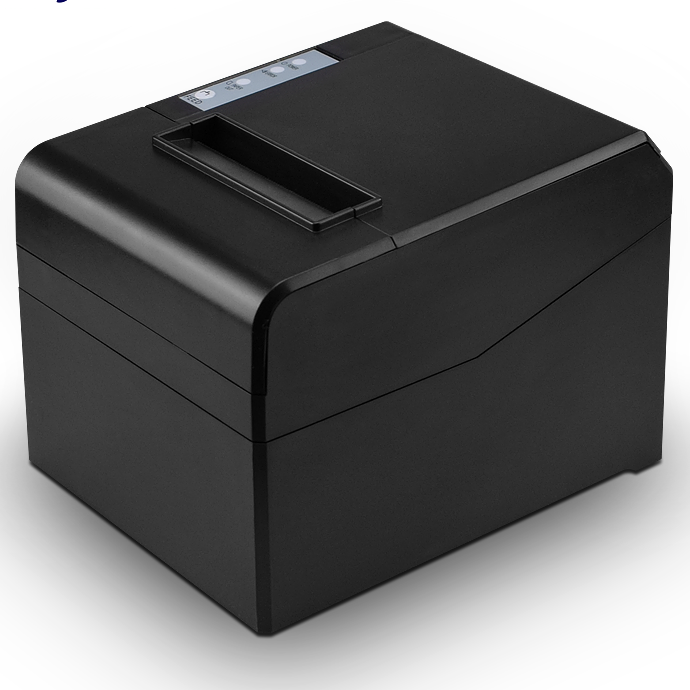
The POS-8330 prints at 260 mm/s with a 576-dot head and a full or partial auto cutter — the same engine as the standard counter unit in this range. What separates it is a chassis designed to be fixed to a wall as well as to sit on a desk, and that single mechanical decision solves a problem that comes up in almost every small-format site.
A 40 cm deep counter has room for a terminal and a customer’s hand. It does not have room for a terminal, a hand and a printer that needs 19 cm of depth plus clearance for the paper to exit and the cover to open. Mounting the printer vertically on the wall above or beside the counter frees the counter for the things the customer touches, and it lifts the paper path out of the way of spilled drinks and wandering hands.
Retrofitting a desk printer to a wall is what goes wrong, so it is worth being specific about what a wall-mount-capable chassis does differently.
Practical mounting height: the paper exit at roughly 90–110 cm from the floor puts the receipt at hand height for a standing customer and keeps the cover clear of a shelf above.
The POS-8330 explicitly lists Linux among its supported operating systems. That line is worth more than it looks, because a large share of self-checkout, kiosk and vending deployments run on Linux and Android rather than Windows — and most cheap 80 mm printers ship a Windows driver and an Android SDK and nothing else.
Linux does not need a vendor driver to print ESC/POS. It needs a CUPS queue with a generic ESC/POS or raw filter, and the command set does the rest. What actually breaks on untested units is subtler:
If you are building a Linux-based kiosk, send us the stack (CUPS version, how you send the job, whether you read status) and we will confirm behaviour on the unit rather than leave it to be discovered at commissioning.
Thermal printers are one-bit devices: each dot is black or white, with no grey. Any image — a logo, a QR code with a soft edge, a promotional graphic — has to be converted to dots, and the conversion method is what determines whether the printed result looks like the design.
The POS-8330 exposes four dithering options. In practice they divide into two behaviours:
Most “our logo prints badly” complaints are not a printer fault. They are a threshold-dithered image being printed at low density on cheap paper. Two fixes, in this order: switch to error diffusion, then raise print density. If the logo still looks weak, the source image is the problem — a 300 dpi black-and-white bitmap prints better on thermal than a colour JPEG that the driver has to convert.
260 mm/s with a 576-dot line at 72 ± 0.5 mm print width, on 79.5 ± 0.5 mm rolls up to 83 mm diameter and 0.06–0.08 mm thick. That is the standard 80 mm geometry, so existing receipt templates render without re-layout.
The 100 km print-head rating is the maintenance number. At 400 receipts a day and 15 cm each, that is about four years of head life — which makes the printer a capital item rather than a consumable. The auto cutter does full or partial cut; on a wall mount, use partial.
The unit is 2 kg with accessories, 18.6 × 14.5 × 13.6 cm, eight to a carton at 17 kg. Power is an external DC 24 V / 2.5 A adapter. The drawer kick-out port is present and driven by an ESC/POS command — confirm your drawer solenoid’s rated voltage against the port before wiring, since a mismatch is the most common cause of a drawer that will not open.
USB is built in, with serial, parallel, Ethernet, Wi-Fi or Bluetooth as the second interface. The combination to think about for a wall-mounted install:
The chassis has mounting points and is designed for vertical installation. Confirm the bracket requirement at quotation stage so the right hardware ships with the order — do not assume a bracket from a different printer will line up.
The paper exits horizontally from the platen. Mounted vertically, the receipt comes out horizontally and hangs from the partial cut. It does not print vertically downward like a label dispenser.
Yes — Linux is listed among the supported systems. It prints through a CUPS queue with a generic ESC/POS filter; no vendor driver is required. If your application reads printer status, confirm the back-channel behaviour with us before commissioning.
Use one of the error-diffusion dithering modes rather than threshold, raise print density if the paper is cheap, and supply a 300 dpi black-and-white bitmap rather than a colour image.
Yes, via the drawer kick-out port and an ESC/POS command. Check the drawer’s solenoid voltage against the port specification — the POS-410A and POS-405A are the drawers in this range.
12 months minimum with a 100 km rated print head. Extended terms available for OEM programmes.
Next step: send us the counter or panel dimensions, the host platform and how the unit will be fixed — we will confirm the bracket, the interface variant and a factory-direct quote. Email sales@dcapos.com or contact us.
Related: POS-8370 80 mm printer with stored logo · thermal receipt printers · POS-8250 80 mm printer · POS-410A cash drawer · POS peripherals
| Specifications | ||
| Interfaces | USB/Serial/Parallel/Ethernet/Wifi/Bluetooth(Optional) | |
| Print Comand | ESC/POS | |
| Print Method | Thermal Line Printing | |
| Print Speed | 260mm/sec | |
| No. of Total Dots | 576 dots/Line | |
| Resolution | 203 dpi (8 dots/mm) | |
| Auto Paper Cutter | Full or Partial cut | |
| Print Width | 72±0.5mm | |
| Character Set | Alphanumeric /Chinese Kanji | |
| Print Font | 12 x 24; 24x 24 | |
| NV Flash | 256K bytes | |
| Compatible OS | Window Systems ; Android & IOS Operate Systems | |
| Paper | ||
| Type | Roll Paper | |
| Width | 79.5±0.5mm | |
| Roll Diameter | 83mm | |
| Paper Thickness | 0.06-0.08mm | |
| Electrical | ||
| Adapter Voltage | DC24V/2.5A | |
| Cash Drawer Control | 12V/1A | |
| Print Head | Reliability | |
| Print Reliability | 100km | |
| Physical | ||
| Dimension | 18.6*14.5*13.6cm | |
| Unit Weight | 2kgs(with accessories) | |
| Pieces Per CTN | 8 Pieces | |
| Color | Black and White | |
| CTN Dimension | 48 x 46 x 36cm | |
| Carton Weight | 17kgs | |
| Environmental | ||
| Temperature | Working: 0 to 45 Degrees | |
| Humidity | Working: 10%-80% | |
| Warantty | 12 months at least | |
| Certificates | CE& FCC ROHS / ISO9001:2008 | |


First time specifying an 80 mm receipt printer? Read what a thermal print head does before you compare dots per line, then what a POS system is made of to see where the printer sits among the five parts.