The Android Answer to a Two-Screen Counter
Dual-screen POS is usually pitched as a Windows product, because that is where the legacy software lives. But a large share of new counter deployments now run Android apps — ordering, table management, loyalty, queue numbers — and those projects hit the same problem: the customer cannot see anything.
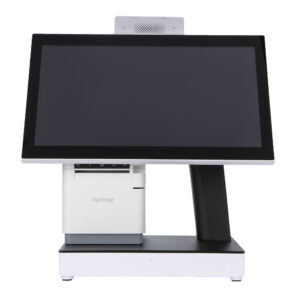
The DCA-Q3A solves it in Android. A 15.6-inch multi-touch main panel, a 10.1-inch non-touch customer display on the rear of the head unit, an RK3566/RK3568 quad-core A55, Android 10 through 13, and a fanless die-cast aluminium body. It is the same two-screen idea as the Windows Q3S, built on the other software platform.
Windows or Android: The Decision Comes First
This is the choice that determines everything else, and it is decided by your software, not by the hardware.
- Take Android if your application is an Android app — a restaurant ordering system, a retail SaaS client, a queue-management app, a custom build for your own chain. Deployment is a download or a pre-installed image, updates are pushed remotely, and the licence cost per terminal is usually zero.
- Take Windows if your software is a Windows POS suite, an ERP client, or anything that needs a COM port, a hardware dongle, or a proprietary driver. The Q3S is that machine.
What you should not do is buy Android hardware and then run a Windows emulator, or buy Windows hardware for an app that was written for Android. Both directions of that mistake are common and both are expensive.
What the Secondary 10.1-Inch Panel Does
The rear panel is a 10.1-inch LED display at 1280 × 800, non-touch, mounted on the back of the head unit and driven by the same terminal. It is not a second workstation — it is the customer’s view of the transaction:
- Order lines as they are entered. The customer watches the basket build, which moves price questions from the receipt to the counter.
- The total and the payment step. Amount due, then a QR code for wallet payment, membership sign-up or feedback — the customer scans with their own phone, and the confirmation appears on the same panel.
- Queue and order numbers. In a food service site the panel can show the number being prepared, which is what a customer actually looks at while waiting.
- Promotion between transactions. A drink bundle, a seasonal item, an opening-hours card. The screen a customer stares at while waiting to pay is the cheapest advertising space in the store.
At 1280 × 800 on 10.1 inches the panel is readable at arm’s length, which is where a customer at a counter actually stands. It is smaller than the 11.3-inch panel on the Q3S — a difference worth knowing if your customer-facing layout carries a lot of text, less important if it carries a total, a QR code and one promotion.
Performance: RK3566, 2 GB, and What It Will Actually Run
The board is an RK3566 or RK3568 quad-core Cortex-A55 at up to 1.8 GHz with 2 GB of DDR4 (4 GB optional) and 16 GB of eMMC (32 GB optional), running Android 10, 11, 12 or 13.
For a single POS application driving two displays, that is a workable configuration — the A55 cores are efficient and the workload is not heavy. Three honest caveats:
- 2 GB is the floor. One Android POS app plus two display outputs fits. Add a browser-based dashboard, a background sync and a video promotion loop, and the system starts closing apps. Specify 4 GB for anything beyond a plain order-entry terminal.
- 16 GB eMMC fills faster than buyers expect. The OS takes a share, the app takes another, and local video for the customer panel takes the rest. If the promotion loop plays video locally rather than streaming, take 32 GB.
- This is not a media player. It drives a second display for a POS interface, not a 4K menu board. For signage rendering, the industrial mini PC range is the right class of hardware.
Interfaces: Built for a Counter, Not a Desk
Four USB ports — one of them OTG — are enough for a scanner, a receipt printer, a card reader and a drawer trigger at the same time, with nothing on a hub. Alongside them: one RJ45 10/100 Ethernet port, one RJ12 serial port, and one RJ11 cash drawer port.
Two details are worth pointing out because they are what separates a POS terminal from an Android tablet in a plastic stand:
- The RJ12 serial port. Scales, older scanners and kitchen printers still speak RS232. Having it on the terminal means no USB-to-serial adapter and one less driver to break after an update.
- The RJ11 drawer port on the terminal itself. On many Android setups the drawer is triggered by the printer. Having it on the terminal as well gives a fallback if the printer is a network unit rather than a USB one.
Ethernet is 10/100 rather than gigabit. For POS traffic — item lookups, order posting, payment authorisation — that is not a bottleneck, and claiming otherwise would be marketing. If your deployment pushes large media or runs local video sync, that is a reason to look at the mini PC range instead.
Thermal Design and the Fanless Argument
The housing is aluminium die-casting with no fan. In an Android terminal at this power level the heat load is modest, but the argument still holds: no fan means no dust drawn into the body and no bearing to fail in year two. In a kitchen, a bakery or a site with flour and oil in the air, that is the difference between a terminal that lasts and one that starts rebooting under load.
At 363 × 350 × 210 mm and 5 kg, the unit is stable on a counter and does not walk when a cable is tugged. Power is a 12 V / 2 A external adapter, so the terminal runs from the same class of supply as the printer and the drawer.
Where the Q3A Fits
- Restaurants and cafés running Android ordering. The main case: order entry on the touchscreen, customer confirmation and queue numbers on the rear panel.
- Convenience and small-format retail. Android retail apps with a customer-facing total and payment QR.
- Chains standardising on an Android app. One image, many stores, remote updates, no per-terminal OS licence.
- Queue and pickup counters. Order number and status on the customer side.
- Not for Windows software. If the application is a Windows POS suite or needs a Windows-only driver, this is the wrong platform — take the Q3S.
Frequently Asked Questions
Can I install my own Android app?
Yes. The unit runs standard Android 10–13 builds; we can ship it with your APK pre-installed and configured, or provide it with a clean image.
Does the secondary display support touch?
No. It is a display-only panel for the customer side: order lines, total, QR code and promotions.
Does it have Google Play services?
Depends on the Android build and on your order. Confirm at specification stage if your app depends on Google Play Services — this is a build decision, not a setting.
How much RAM should I specify?
2 GB for a single POS app with two display outputs. 4 GB if the terminal also runs a dashboard, background sync or local video for the customer panel.
Can it drive a cash drawer and a receipt printer at once?
Yes — drawer on the terminal’s RJ11 port, printer on USB (or on the drawer port of the printer, if you prefer the conventional wiring).
What is the operating temperature range?
0–40 °C at 5–90% relative humidity, with a storage range of −20 to 60 °C. It is an indoor counter terminal.
Next step: tell us which Android app you run, whether it needs Google Play Services, the customer-facing layout you want on the rear panel, and whether you need 2 GB or 4 GB — we will confirm the build and quote factory-direct. Email sales@dcapos.com or contact us.
Related: DCA-POS116A 11.6-inch POS · Android POS systems · DCA-Q3S Windows dual-screen POS · DCA-Q3 single-screen Windows POS · POS systems
| Model No. |
DCA-Q3A |
| SYSTEM |
| Processor |
RK3566 ARM Cortex-A55 Quad-Core, 1.8Ghz
RK3568 ARM Cortex-A55 Quad-Core, 2.0Ghz |
| Memory |
2GB DDR4 (4GB Option) |
| Storage |
16GB EMMC (32GB Option) |
| OS |
Android 10/11/12/13 |
| DISPLAY |
| Type |
15.6 inch LED Backlight Display |
| Resolution |
1366*768(1920*1080 Option) |
| Brightness |
250 nits/350nits |
| Aspect Ratio |
16:9 |
| Touchscreen |
Multi-touch capacitive screen, G+G |
| SECONDARY DISPLAY |
| Type |
10.1 inch LED Backlight Display (1280*800 Non Touch) |
| INTERFACE |
| USB |
4*USB(Including 1*USB OTG) |
| LAN |
1*RJ45 10/100M Ethernet |
| Serial |
1*RJ12 |
| Cash Drawer |
1*RJ11 |
| Power DC-IN |
Input AC 100~240V/50~60hz, Output DC 12V/2A |
| PHYSICAL&ENVIRONMENTAL |
| Operating Temperature |
Operating 0~40° at 5% to 90% Humidity |
| Storage Temperature |
Storage -20°~60° at 10% to 90% Humidity |
| Dimensions |
(W×H×D) 363x350x210 MM |
| Packing Dimensions |
(W×H×D) 430x450x290 MM |
| Net Weight |
5.0KG |
| Packing Weight |
6.50KG |
| Color |
White/Black |
| OPTIONS & PERIPHERALS |
| Wifi |
IEEE 802.11 b/g/n, Single band 2.4 GHz |
| Bluetooth |
Bluetooth 4.2 |
| Speaker |
1*2W |