Buying guide
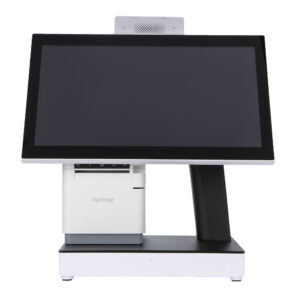
Six terminals, one operating system. What separates them at the counter is the CPU tier, whether there is a customer-facing display, and how much counter depth the base takes up.
The DCA-155W and DCA-151WS run an Intel Celeron J1900 quad-core. That is enough when the till drives one POS application and a printer. Move up to a Core i3/i5/i7 when the same box also runs a local database, a second screen and a browser with a dozen tabs open.
The DCA-Q3S mounts an 11.3-inch non-touch panel on the back of the head unit, showing the item list and the running total. The DCA-151WS takes a 9.7 or 12-inch customer screen. A character VFD on a pole is cheaper and stays readable in direct sun, but it can only show a total.
The DCA-152W folds its stand flat for a shallow counter or a shared till position. The other five sit on a fixed base. Measure the drawer cut-out and the space between the counter edge and the customer before choosing, then check that the VESA pattern clears the cash drawer.
| Model | Panel | What it adds |
|---|---|---|
| DCA-155W | 15 inch | Celeron J1900, the plain single-screen till |
| DCA-151WS | 15 inch | 9.7 or 12-inch customer screen option, VGA / HDMI / COM |
| DCA-Q3S | 15.6 inch | 11.3-inch rear display, non-touch, 80 mm printer |
| DCA-Q3 | 15.6 inch | 11.6 or 15-inch rear display, 80 mm printer |
| DCA-KSW | 15 / 15.6 inch | optional built-in thermal printer and 1D/2D scanner |
| DCA-152W | 15 / 15.6 inch | foldable stand for a shallow counter |
Yes. Units ship with Windows installed or with a blank drive, and we can load your image and the printer, scanner and display drivers at the factory. Send the image size at order time so the SSD partition is cut to match.
The DCA-Q3 and DCA-Q3S take an 80 mm printer inside the head unit as standard, and the DCA-KSW takes one as an option together with a 1D/2D scanner. The DCA-155W, DCA-151WS and DCA-152W are screen-only and drive a separate 58 mm or 80 mm printer over USB or LAN, which is the better arrangement when the printer sits on the other side of the counter.
Every unit has USB for a pole display, and the 155W, 151WS, 152W and KSW also carry an RS-232 port for one. The integrated LCD panels are model-specific: 11.3-inch on the DCA-Q3S, 11.6 or 15-inch on the DCA-Q3, 9.7 or 12-inch on the DCA-151WS.
Read nextHow a POS system works, sale by sale · What is an EPOS system?
Tell us the counter layout and the software you run, and we will quote the terminal with the right CPU tier and display. Retail deployments are documented on the retail hardware page.
This is a gallery to showcase images from your recent social posts
“A review from a customer who benefited from your product. Reviews can be a highly effective way of establishing credibility and increasing your company's reputation.”
Customer Name
“A review from a customer who benefited from your product. Reviews can be a highly effective way of establishing credibility and increasing your company's reputation.”
Customer Name

Premium POS Hardware Manufacturer Trusted by 3,000+ Customers | OEM/ODM Touch Screen Solutions Since 2013.
Furong Lantian Industrial Park, Xinqiao,Shajing Town,Shenzhen China.
Get the latest updates via email.Any time you may unsubscribe.