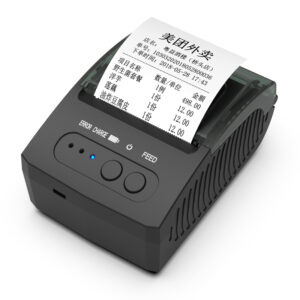
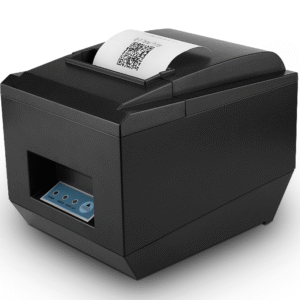
POS-8220 80mm Thermal Receipt Printer with USB/RS232/LAN Port for Restaurant Supermarket Store
The POS-8220 features a compact structure that is also water-proof, oil-proof, and dust-proof, ensuring longevity even in challenging settings like kitchens and busy retail.
Designed for easy paper loading and built with ultra-durable internal gearing, leading to a long operational lifetime and a low repair rate.
High-speed printing for both text and images, delivering excellent print quality and maintaining steady, reliable performance shift after shift.
Multiple interface options (USB, RS232, LAN as standard) for flexible integration into diverse POS systems.
Full compatibility with Windows (including Win 7) and Linux operating systems, alongside industry-standard EPSON ESC/POS and STAR command sets
Designed to be applicable with a wide range of software applications.
Features like black mark orientation for precise printing, a re-print function, and programming to avoid lost print orders ensure transaction integrity.
Jam-Free Performance: An optional partial or whole auto-cutter is engineered for reliability, effectively preventing paper jamming issues.
Real-Time Monitoring: Our printer status monitor function allows you or your end-users to control and check the printer’s status at any time, enabling proactive management.

If you want more information of our industry and products,please contact us.
Get to Know Us Now
A receipt printer at a front counter sees paper dust and the occasional spilled drink. A receipt printer in a kitchen sees oil vapour, flour, heat, steam, and a stream of tickets at every service peak. Those are different machines in the way that matters, and it is why the same 260 mm/s mechanism appears in two different chassis in this range.
The POS-8220 is the heavy-chassis version: the same 576-dot, 72 mm print engine and full or partial auto cutter as the counter unit, but built around a sealed, splash-resistant housing with a reinforced internal gear train, at 2.3 kg instead of 2 kg. It is the unit we send when the printer’s job is printing kitchen tickets for eight hours a day.
2.3 kg sounds like a specification nobody asked for. In a kitchen it is the difference between a printer that stays where it was mounted and one that ends up on the floor.
Three things push a printer around in a commercial kitchen:
If you are installing on a shelf or a wall bracket, fix the unit down regardless. If it sits loose on the pass, mass is doing real work.
These words appear on a lot of datasheets without qualification, so it is worth being precise about what they do and do not mean on an 80 mm thermal printer.
The POS-8220 is described as waterproof, oil-proof and dust-proof in its specification. In practice that means the housing resists splashes from a wipe-down, does not stain or soften under oil vapour, and keeps flour and paper dust out of the mechanism. It does not mean the unit is submersible, and it does not mean it can be hosed down. There is no IP rating published for this model — if a tender requires one, tell us and we will confirm what can be documented rather than let you assume a number.
What the sealing buys in real terms:
The cutter and the paper feed are driven by a gear train, and on low-cost units it is the first thing to strip. The failure mode is predictable: the paper jams, staff pull it out by hand, the feed gear loses teeth, and from then on the printer feeds unevenly or cuts halfway through the ticket.
A reinforced gear train plus an auto cutter rated for full or partial cut is the specification that prevents it. Combined with the 100 km print-head rating and the 576-dot head at 72 ± 0.5 mm print width, the maintenance story is: clean the head, change the roll, and expect the mechanism to outlast the warranty by a wide margin.
One habit worth building into the site: never clear a jam by pulling the paper backwards through the mechanism. Open the cover, release the platen, lift the paper out. That single rule removes most of the gear-train failures we see.
Kitchen printing is where print speed actually matters, because tickets arrive in bursts. A four-item order with modifiers and a table number is a short document; a table of eight with a set menu is not. At 260 mm/s a long ticket clears in about a second, and the gap to a 220 mm/s unit becomes visible precisely when three tickets arrive at once.
The other half of the speed story is the queue. Because the printer buffers data, the POS can hand off a ticket and move on. What the kitchen notices is the time from “send” to “paper in hand”, and that is print speed plus network latency plus however long the previous ticket took.
The POS-8220 carries the full interface set: USB, serial, parallel, Ethernet, and Wi-Fi or Bluetooth as options. For a kitchen station the useful ones are Ethernet and, in older installations, serial.
If the site uses a KDS instead of paper, you do not need this printer at the pass at all — the kitchen display system replaces the ticket rail. Many operators run both: KDS for the line, one paper printer for the expediter and for the tickets that must survive a screen failure.
79.5 ± 0.5 mm rolls up to 83 mm in diameter, 0.06–0.08 mm thick. In a kitchen the roll change interval is the operational number: an 83 mm roll holds meaningfully more than the 60–65 mm rolls used in compact printers, which is the difference between one change per service and three.
Operating range is 0–45 °C at 10–80% humidity. That is fine on a pass. It is not fine directly above a fryer or inside an unventilated cabinet — thermal paper darkens and curls above roughly 50 °C, and a printer in that position will produce grey, curling tickets no matter which model you buy. Mount it at least a metre from a direct heat source with some airflow.
Power is an external DC 24 V / 2.5 A adapter. Put it on the same switched outlet as the terminal so the printer is not left holding a queue while the till is off.
Between the four, the choice for a kitchen is not close: take the sealed chassis. Between a counter and a back office, the lighter units make more sense on price and freight.
Yes — the housing is specified as splash-resistant and oil-resistant, so a damp wipe-down is fine. It is not submersible and should not be hosed or sprayed directly. Clean around the paper path with the cover closed.
No IP rating is published for this model. If your tender or site standard requires one, ask us and we will tell you what can be documented rather than quote a number we cannot support.
Ethernet is the normal deployment: the printer gets an IP address and the POS sends tickets to it over the LAN. Serial is used where legacy software expects a COM port. USB works if the printer is beside the terminal.
They are complementary rather than alternatives. Many sites run a KDS on the line plus one paper printer for the expediter and for continuity if a screen fails.
Yes. The 256 KB NV Flash stores a logo image that is called by command, and table or order references are plain ESC/POS text in the ticket template.
12 months minimum, 100 km rated print head. Extended terms are available for OEM and chain programmes — ask at quotation stage.
Next step: tell us the station (pass, bar, front counter), the daily ticket volume and how the site is cabled — we will confirm the interface variant and quote factory-direct. Email sales@dcapos.com or contact us.
Related: POS-8370 80 mm printer with stored logo · thermal receipt printers · kitchen display system · POS-8250 80 mm printer · POS peripherals
| Specifications | |||
| Interfaces | USB/Serial/Parallel/Ethernet/Wifi/Bluetooth(Optional) | ||
| Print Comand | ESC/POS | ||
| Print Method | Thermal Line Printing | ||
| Print Speed | 260mm/sec | ||
| No. of Total Dots | 576 dots/Line | ||
| Resolution | 203 dpi (8 dots/mm) | ||
| Auto Paper Cutter | Full or Partial cut | ||
| Print Width | 72±0.5mm | ||
| Character Set | Alphanumeric /Chinese Kanji | ||
| Print Font | 12 x 24; 24x 24 | ||
| NV Flash | 256K bytes | ||
| Compatible OS | Window Systems ; Android & IOS Operate Systems | ||
| Paper | |||
| Type | Roll Paper | ||
| Width | 79.5±0.5mm | ||
| Roll Diameter | 83mm | ||
| Paper Thickness | 0.06-0.08mm | ||
| Electrical | |||
| Adapter Voltage | DC24V/2.5A | ||
| Cash Drawer Control | 12V/1A | ||
| Print Head | Reliability | ||
| Print Reliability | 100km | ||
| Physical | |||
| Dimension |
|
||
| Unit Weight | 2.3kgs(with accessories) | ||
| Pieces Per CTN | 8 Pieces | ||
| Color | Black and White | ||
| CTN Dimension |
|
||
| Carton Weight | 19kgs | ||
| Environmental | |||
| Temperature | Working: 0 to 45 Degrees | ||
| Humidity | Working: 10%-80% | ||
| Warantty | 12 months at least | ||
| Certificates | CE& FCC ROHS / ISO9001:2008 | ||
First time specifying an 80 mm receipt printer? Read what a thermal print head does before you compare dots per line, then what a POS system is made of to see where the printer sits among the five parts.
Where this model is already deployed.
As a professional POS hardware manufacturer in China, we provde OEM/ODM POS service.


Premium POS Hardware Manufacturer With 5000+ Projects Completed | OEM/ODM Touch Screen Solutions Since 2014.
Furong Lantian Industrial Park, Xinqiao,Shajing Town,Shenzhen China.
Get the latest updates via email.Any time you may unsubscribe.