






Buying guide
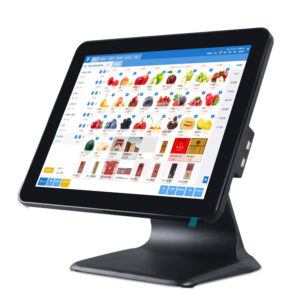
Twelve terminals across three shapes: an 11 to 15.6 inch all-in-one with the printer inside, a modular die-cast unit that can take a second customer screen, and a foldable-stand model for a counter only 40 cm deep. What settles the rest of the specification is the board, not the badge on the front.
DCA-Q3A runs an RK3566 on Android 10 to 13, DCA-Q3 takes J1900, J6412 or Core i3 and i5 with Windows 10 or 11 IoT, and DCA-155A covers RK3566 or RK3568 on Android 11. Same screen size, same footprint, different board. Pick the board your POS application is already certified on, then the screen, then the chassis - moving a unit from Android to Windows is not a field operation.
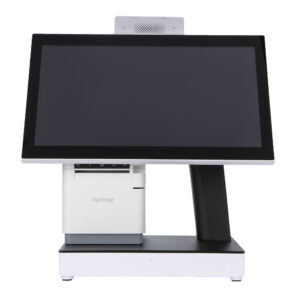
DCA-KSA and DCA-KSW carry a 58 or 80 mm printer and an auto cutter inside the terminal, so the lane needs one power lead instead of two and there is no separate printer to mount. The trade is depth: the chassis is deeper than a printerless model of the same screen size, and the roll loads from the front or the top, so leave clearance to open it. If a receipt printer is already bolted under the counter, take DCA-155A or DCA-Q3 and use that printer instead.
DCA-Q3A pairs a 15.6 inch main screen with a 10.1 inch rear panel, DCA-Q3S pairs 15.6 with 11.3 inch, and DCA-151WS keeps a 4:3 15 inch main with a 9.7 or 12 inch front screen. The rear panel shows the running total, the payment QR or a quote while the cashier works. It needs a second video output and, on Windows, a display profile that survives a reboot - check that on one lane before rolling out to twenty.
| Model | Main screen | Platform | Printer | Note |
|---|---|---|---|---|
| DCA-NB11 | 11 inch | Android | 58 mm | built-in battery and 4G, pop-up counters |
| DCA-POS116A | 11.6 inch | Android | 58 mm | narrowest all-in-one |
| DCA-156A | 15.6 inch 1920x1080 | RK3568 | no | bezel-less die-cast body |
| DCA-KSA | 15.6 inch 1366x768 | Android | 58 / 80 mm + cutter | optional 2D scanner, NFC, webcam |
| DCA-155A | 15.6 inch | RK3566 / RK3568 | no | optional 15.6 or 12.1 inch sub-display |
| DCA-Q3A | 15.6 + 10.1 inch | RK3566, Android 10-13 | no | dual screen, fanless die-cast |
| DCA-Q3 | 15.6 inch | J1900 / J6412 / i3 / i5 | no | modular aluminium die-cast |
| DCA-Q3S | 15.6 + 11.3 inch | Windows | no | dual screen |
| DCA-KSW | 15.1 or 15.6 inch | Windows | 58 / 80 mm + cutter | cash drawer port on the terminal |
| DCA-155W | 15.1 or 15.6 inch | J1900 / J4125 / i3 / i5 | no | 2 x RS232, 6 USB, Win 10 IoT LTSC |
| DCA-151WS | 15 inch 4:3, 1024x768 | Windows | no | 9.7 or 12 inch front display |
| DCA-152W | 15 or 15.6 inch | Windows | no | folds flat for shallow counters |
The Q3 line comes closest: DCA-Q3A is the Android dual-screen build and DCA-Q3S the Windows one, but the rear panel differs, 10.1 against 11.3 inch, and the boards are not interchangeable. State the operating system when you order rather than planning to switch later.
On DCA-KSW the drawer port sits on the terminal itself. Where a terminal has no printer, the drawer triggers from the RJ11 port on the external receipt printer, which is why the drawer and the printer are normally specified together.
DCA-156A runs 1920x1080 and DCA-KSA runs 1366x768 at the same diagonal. For a till screen showing a product grid and a total, 1366x768 is enough and cheaper to drive. The higher panel earns its place when the terminal doubles as a menu board, a planogram viewer or a video surface.
Read nextWhat is a POS system, part by part
Send the counter depth, the POS software and whether the receipt prints at the till, and we will shortlist from the twelve. The wider hardware range is on the POS system page.
This is a gallery to showcase images from your recent social posts
“A review from a customer who benefited from your product. Reviews can be a highly effective way of establishing credibility and increasing your company's reputation.”
Customer Name
“A review from a customer who benefited from your product. Reviews can be a highly effective way of establishing credibility and increasing your company's reputation.”
Customer Name


Premium POS Hardware Manufacturer With 5000+ Projects Completed | OEM/ODM Touch Screen Solutions Since 2014.
Furong Lantian Industrial Park, Xinqiao,Shajing Town,Shenzhen China.
Get the latest updates via email.Any time you may unsubscribe.