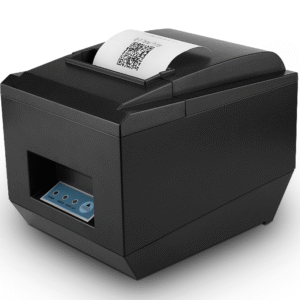
If you want more information of our industry and products,please contact us.
Get to Know Us Now
Every 4-inch label printer prints at 203 dpi. Every one of them moves paper at something between 150 and 160 mm/s. On the specifications that get compared, they are close to identical — and yet some of them work for two years without a jam and others need the sensor cleaned every week.
The difference is paper handling, and it is what the POS-9210 is built around: a dual-wall frame, an external bracket paper holder that takes two different label stocks, and no ribbon, no ink and no cartridge to change.
Most desktop label printers have the roll sitting inside the body. That works until you need a second label size, at which point you either swap rolls or buy a second printer.
This unit takes the roll on an external bracket, which allows two different label stocks to be mounted at once — shipping labels and small product labels, for example — and switched between without dismantling anything. In a small business that ships parcels and also labels its own products, that is the difference between one printer and two.
Three practical consequences:
The print width is 100 mm (800 dots) on paper up to 110 ± 0.5 mm wide, at 203 dpi — 8 dots per millimetre. That is the standard 4-inch label format, which is the format every courier waybill uses.
Paper thickness range is 0.06–0.30 mm, which covers the whole practical range: thin thermal receipt stock at one end, and thicker tag and synthetic label stock at the other. Paper types supported are continuous paper, label paper, folded paper and tag paper, so fan-folded waybill stock works as well as rolls.
Resolution of 203 dpi is the right choice for labels and the wrong one for photographs. For a barcode, 203 dpi produces bars that scan reliably at any reasonable distance; for a shipping label with an address block, a barcode and a logo, it is exactly the density the format was designed around. A 300 dpi label printer is for very small text or dense 2D codes on tiny labels — for a standard waybill it adds nothing.
The unit accepts CPCL, TSPL and ESC/POS commands. That combination matters more than any specification on the sheet, because it decides which software can drive it.
In practice this means the printer works with label design software on Windows and Mac without a bespoke driver, and with shipping platforms that already emit TSPL or CPCL — which is most of them. If your software names a language, check it against those three before ordering; a label printer that speaks the wrong command set is a paperweight regardless of its hardware.
Windows and macOS have drivers, and iOS and Android are supported through the vendor app over Bluetooth or Wi-Fi. Linux is listed in the compatibility set, which is worth noting because a label printer without a Linux driver cannot be used with a Raspberry Pi shipping station or a Linux-based warehouse terminal — a common requirement that budget label printers often fail.
Interfaces are USB, LAN, Bluetooth and Wi-Fi (optional). The mapping that matters:
A dual-wall frame is the structural detail that matters on a printer that runs all day. A single-wall plastic chassis flexes under the torque of the stepper motor and the pull of the paper, and the symptom is misregistration — labels printed a millimetre off, or barcodes that drift down the label as the roll empties. A dual-wall frame holds the platen and the head in alignment.
The unit is 226 × 180 × 147 mm at 2 kg with accessories, which is the heavier end of this class and consistent with the frame. Mechanical noise is specified under 60 dB, which is normal for a thermal mechanism — a packing bench with one printer running is not objectionable; three in a small room is.
Operating range is 0–50 °C at 20–85% RH non-condensing, storage −20 to 60 °C. Power is an external DC 24 V / 2.5 A adapter with a 100–240 V input, so it works on any mains supply without a voltage-specific part.
Eight units per carton, 60 × 39.6 × 34.4 cm at 17 kg gross.
Four desktop units share this print engine, and the differences are in paper handling rather than output quality.
No. It is direct thermal: the print head heats the thermal coating on the label stock. The only consumable is the paper, and the head is a wear part.
Yes, over Bluetooth using the vendor app, on iOS and Android. That is how most small sellers print courier waybills.
Up to 110 mm wide paper with a 100 mm (800 dot) print width, thickness 0.06–0.30 mm. Standard 4-inch courier waybills fit directly.
Yes — macOS drivers are listed, along with Windows, Linux, iOS and Android.
TSPL for label software and warehouse systems, CPCL for Zebra-compatible applications, ESC/POS if you also want plain receipt output. The printer accepts all three.
12 months minimum. OEM branding, packaging and pre-set command language are available — ask at quotation stage.
Next step: tell us the label size and stock type, the software that generates the label, and how the printer connects (USB, LAN or Bluetooth) — we will confirm the configuration and quote factory-direct. Email sales@dcapos.com or contact us.
Related: thermal printers · POS-9250 label printer · POS-8250 receipt printer · POS peripherals
| Interfaces | USB / LAN / Bluetooth / WIFI | |
| Print Comand | CPCL / TSPL command (ESC/POS command) | |
| Print Method | Direct Line Thermal | |
| Pirnt Speed | 160mm/sec (MAX) | |
| Resolution | 203DPI (8dot/mm) | |
| Inner Code | Supported 11 types font size | |
| Paper | ||
| Thermal Paper Types | continuous paper, label paper, folded paper, tag paper | |
| Effective Print Width | 100mm (Max 800 points) | |
| Available Max Paper Width | 110 ± 0.5mm | |
| Paper Thickness | 0.06-0.30 mm | |
| Electrical | ||
| Charging Method | external charger DC 24V/2.5A | |
| Physical | ||
| Printer Dimension | 226x180x147mm | |
| Unit Weight | 2 kgs (with accessories) | |
| Pieces per CTN | 8 pcs | |
| CTN Dimension | 60×39.6×34.4 CM | |
| G.W. per CTN | 17 kgs | |
| Environmental | ||
| Operating Temperature | +0 ℃ ~ 50 ℃ (no condensation allowed) | |
| Working Humidity | 20% ~ 85% RH (no condensation allowed) | |
| Storage Temperature | -20 ℃ ~ 60 ℃ (no condensation allowed) | |
| Storage Humidity | 5% ~ 95% RH (no condensation allowed) | |
| Mechanical Noise | less than 60dB (A weighted RMS) | |


First time specifying a barcode label printer? Read how thermal transfer differs from direct thermal before you choose a label stock, then what a barcode scanner can actually read to match print quality to the reader.