
Interactive Displays, Signage and Canteen POS for Schools
Shared-use hardware fails differently from single-user hardware. DcaPOS supplies classroom touch displays, corridor signage, canteen terminals and library stations built for hundreds of users a day and no on-site IT team.
Why shared-use hardware fails
A school device is used by two hundred people a week, none of whom own it. That changes what matters in the specification.
Hands, not one hand
A classroom panel takes ten-point touches from students who have just come in from the playground. Projected capacitive glass survives that; a thin film overlay does not. Scratch resistance and an anti-glare surface matter more than the panel’s peak brightness.
Chalk dust and classroom cleaners
Dust settles on the top edge of every wall-mounted unit and cleaner gets sprayed at the bezel. A sealed front panel with no exposed seams keeps both out. Anything with a fan will pull the dust inside within a term.
No one to service it
There is rarely an IT technician in the building. The device has to auto-start, reconnect to the network and relaunch its application after a power cut, without anyone logging in. Remote management and a documented recovery procedure are part of the deliverable.
Fixed budgets and long refresh cycles
School hardware is bought on a tender cycle and kept for six to eight years. Spare parts availability and a stable BOM revision over that window are worth more than a marginally better specification today.
Station by station
The pattern below is what a secondary school or a small college campus typically needs.
| Station | What we specify | Why |
|---|---|---|
| Classroom | 65 to 86-inch interactive panel or 32-inch touch monitor for small rooms | Ten-point PCAP, anti-glare glass, wall mount with a service clearance. |
| Corridor and canteen signage | 43 to 55-inch commercial panel with a fanless player | Timetables, menus and notices pushed from a central CMS. |
| Canteen and library | 15.6-inch Android terminal with built-in printer, or a compact touch monitor | Meal payments and book check-out handled without a desktop PC. |
| Reception and wayfinding | Floor-standing kiosk, 23.8 to 32-inch | Visitor sign-in and campus maps at the entrance. |
| Lab and prep room | Fanless mini PC, VESA mount, dual display | Runs lab software without a fan pulling chemical dust into the chassis. |
Hardware we build for this sector
Every unit below is a current production model with its own specification page. Housing, memory, screen size and interfaces are configured per order.
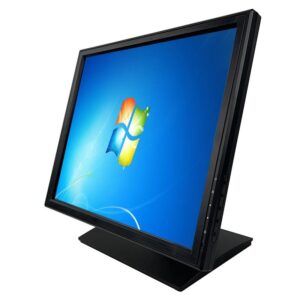
Touch Screen LCD POS Monitor DCA-1701
Touch monitor for small rooms, library desks and lab benches.
View specifications →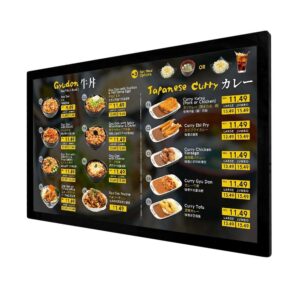
Digital Menu Board
Commercial signage panel for corridors, canteens and notice boards.
View specifications →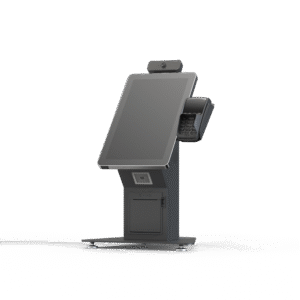
Self Service Kiosk K Series
23.8 to 32-inch kiosk for reception sign-in and campus wayfinding.
View specifications →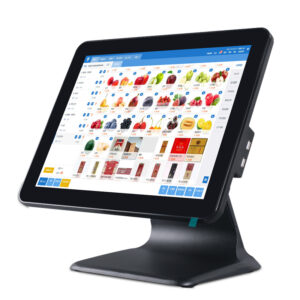
Android POS System DCA-155A
15.6-inch canteen terminal, RK3566 or RK3568, rear display option.
View specifications →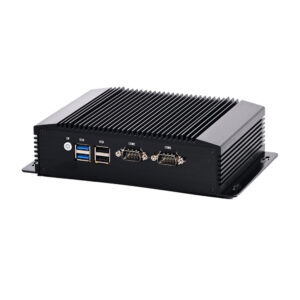
Industrial Mini PC DCA-M100
Fanless player and lab PC, VESA mounted behind the screen.
View specifications →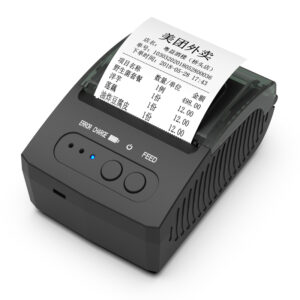
58mm Portable Thermal Printer POS-5811
Compact receipt printer for canteen and library stations.
View specifications →More models for this sector
The other 6 models we build for education, filed by hardware family. All are in current production, and housing, memory, screen size and interfaces are set per order.
Browse the full range: Touch Monitor, KDS / AIO PC · all POS hardware
What we customise
Education projects are usually won or lost on mounting, tendering documentation and after-sales support, not on the panel.
Mounting and safety
Wall, trolley and floor-stand options with documented load ratings and service clearance, plus anti-tip bases for mobile stands.
Management and lockdown
Kiosk mode, app whitelisting, scheduled power on and off, and remote configuration so a device can be reset without a site visit.
Tender documentation
Specification sheets, test records, certification copies and serial-number lists formatted for procurement and asset registers.
Long-life support
Spare parts committed for the refresh cycle, with a spares kit sized to the number of rooms rather than shipped per fault.
Frequently asked questions
The questions buyers ask before they place a first order.
How many touch points does a classroom panel need?
Ten-point projected capacitive is the practical baseline: it lets several students work at once and it still registers a single deliberate touch when a sleeve or palm rests on the glass. Resistive panels are cheaper but need pressure and do not survive shared use well.
Will the panel run our existing teaching software?
The panel is a display with a touch controller; what runs the software is the OPS module or the PC attached to it. Tell us the software and OS you use and we will propose the module to match, including whether a Windows or Android player is the better fit.
Can signage be managed centrally across a campus?
Yes. The player is a standard Windows or Android device, so your CMS pushes content the same way it would to any other endpoint. We can pre-configure the player with your CMS client and network settings so a new screen is a drop-in replacement.
What happens after a power cut?
Devices are configured to power on automatically, reconnect and relaunch their application without a login prompt. We test the power-cycle sequence before shipping because it is the most common cause of "the screen is broken" calls in schools.
Do you support tender and framework purchases?
We supply the specification sheets, certification copies and test records that procurement packages require, and we quote a fixed BOM revision so the delivered unit matches the tendered specification. Serial-number lists are provided per site for asset registers.
Planning a classroom or campus refresh?
Send the room list, the software you teach with and the tender timeline. We will return a per-room hardware schedule.
Send your requirements
