If you want more information of our industry and products,please contact us.
Get to Know Us Now
Almost every wireless scanner on the market is a radio that extends a cable. Walk out of range and it stops working — no scan, no beep, nothing stored. That is fine for a till. It is useless for stocktaking, where the whole point is to walk a warehouse or a shop floor for two hours and collect thousands of codes.
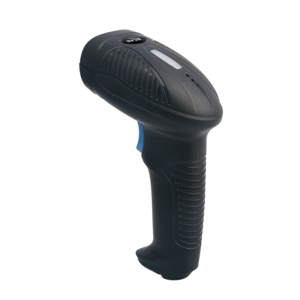
The POS-2210A is the other kind. It stores up to 100,000 thirteen-digit barcodes in its own memory, which means it keeps scanning with the receiver switched off, out of range, or in a building with no Wi-Fi at all — and uploads the batch when it comes back. That single capability turns a barcode scanner into a stocktaking tool.
The unit supports four modes, and the difference between them is the difference between four products.
In practice a stocktake runs in inventory mode, uploads in a batch, and the counting application reconciles against expected quantities. Without the repeat accumulation, the receiving system has to count duplicates itself — which is possible, but slower and more error-prone when the batch is 30,000 lines.
Storage capacity of 100,000 thirteen-digit barcodes is the headline. The battery is what makes it usable: 2,600 mAh lithium, six hours to charge, ten hours of working time.
Ten hours is a full shift plus a stocktake. What it is not is a multi-day audit without charging, so plan a cradle or a charging point where the stocktake starts. A scanner that dies at hour nine loses nothing in the buffer — the stored codes persist — but the audit stops.
Two practical notes from how these units are actually used:
The link is 2.402–2.480 GHz, the standard 2.4 GHz band, with a 30 m operating distance in open space.
Thirty metres open space translates to considerably less through shelving, a concrete floor or a steel rack — which is exactly why cache mode exists. The rule of thumb for deployment: use real-time mode within line of sight of the receiver, and switch to cache mode the moment the walk takes you out of it. Trying to make real-time mode work at the far end of an aisle is how stocktakes end up with missing lines.
The receiver is a small USB dongle, 57 × 16 × 7.5 mm and 5 g, so it barely obstructs a port and can be left in permanently. The scanner itself is 95 × 67 × 170 mm at 160 g — heavier than a light retail scanner, which is the cost of the battery and the memory, and still comfortable for a shift.
A 640 × 480 CMOS imager with a 45° × 35° field of view, 4 mil minimum resolution, 360° roll and ±60° pitch and skew, and a symbol contrast floor of 15% — a forgiving figure that handles faded or thermally printed labels better than a higher-contrast-only scanner.
The published depth of field is where the practical behaviour shows:
Symbology coverage is the full 2D set — Aztec, Data Matrix, MaxiCode, Micro QR, PDF417, Micro PDF417, QR, HanXin — plus Code 128, Code 11, Code 32, Code 39, Code 93, EAN/UPC, Interleaved 2 of 5, Matrix 2 of 5, MSI and Codabar. GS1 DataBar is not in the published list for this model; if your stock uses DataBar on fresh or pharmacy items, confirm before ordering rather than assume.
Three decisions determine whether the unit works in your workflow, and all three are easier to settle at quotation stage than after delivery:
Yes, in cache and inventory modes. It scans into its own memory with the receiver unplugged, and uploads the batch when connected. That is the capability that separates it from a simple wireless scanner.
100,000 thirteen-digit barcodes.
Ten hours of working time, six hours to charge, on a 2,600 mAh lithium pack.
Yes — full 2D coverage including Aztec, Data Matrix, MaxiCode, Micro QR, PDF417, QR and HanXin, plus the standard 1D set.
The scan is lost unless the mode is cache. Switch modes before walking out of coverage; that is the single most important operational instruction for this unit.
No. The receiver enumerates as a USB keyboard or as a virtual COM port depending on the configured mode.
12 months minimum. OEM branding, packaging and pre-configured modes are available for programme orders.
Next step: tell us the workflow (till, stocktake, receiving), whether the host application expects keyboard input or a COM port, and how many units — we will pre-configure the mode and quote factory-direct. Email sales@dcapos.com or contact us.
Related: POS-1670 handheld scanner · POS peripherals · POS-3230A 2D scanner · POS-8280A desktop imager · POS systems
|
Wireless Attributes
|
||
|
Radio Technology
|
2.402GHz to 2.480GHz
|
|
|
Operation Distance
|
30m (open space)
|
|
|
Working Mode
|
Wired transmission mode/wireless transmission real-time mode/cache mode/inventory mode
|
|
|
Storage Capacity
|
100,000 13-digit barcodes
|
|
|
Battery
|
Volume 2600mAh (lithium battery), Charge Time 6 hours, Working Time 10 hours
|
|
|
Performance Characteristics
|
||
|
Image Sensor
|
CMOS
|
|
|
Image(Pixels)
|
640 pixels (H) x 480 pixels (V)
|
|
|
Interfaces
|
USB(HID、CDC)
|
|
|
Symbologies |
2D
|
Aztec Code,Data Matrix Code,Maxicode,Micro QR Code,PDF417,QR Code,MicroPDF417,HANXIN code,etc.
|
|
1D |
Code128,Code11,Code32,Code39,Code93 ,EAN/UPC,EAN-8,EAN-13,Full ASCII Code39, Interleaved 2 of 5,Matrix 2 of 5,MSI,UPC-A ,UPC-E,
Codabar,Codablock A,Codablock F, GS1 DataBar Expanded,GS1 DataBar Limited,GS1 DataBar Omnidirectional,etc. |
|
|
Resolution
|
≥4mil
|
|
|
Light Source
|
Aiming: Red LED, Illumination: White LED
|
|
|
Scan Angle
|
Roll 360°,Pitch±60°,Skew±60°
|
|
|
Symbol Contrast
|
≥15%
|
|
|
Field of View
|
Horizontal 45° , Vertical 35°
|
|
|
Typical Depth of Field
|
Code128
|
35mm-200mm(10mil)
|
|
UPC
|
35mm-270mm(13mil)
|
|
|
PDF417
|
20mm-200mm(10mil)
|
|
|
Data Matrix
|
20mm-150mm(10mil)
|
|
|
Mechanical / Electrical Attributes
|
||
|
Dimensions (mm)
|
Scanner 95 x 67 x 170, Receiver 57 x 16 x 7.5 ( L x W x H)
|
|
|
Weight
|
Scanner 160g, Receiver 5g
|
|
|
Notification
|
LED, Buzzer
|
|
|
Working voltage
|
DC 5V±5%
|
|
|
Working Current
|
240mA
|
|
|
Environmental Attributes
|
||
|
Operating Temperature
|
-10°C to +60°C
|
|
|
Storage Temperature
|
-20°C to +70°C
|
|
|
Humidity
|
5% to 95% ( non-condensing )
|
|
|
Ambient Light
|
0 to 100,000 LUX
|
|
|
Accessories
|
||
|
Cable
|
USB Cable
|
|


First time specifying a handheld barcode scanner? Read why a laser cannot read a phone screen before you pick an engine, then what a POS system is made of to see where the scanner plugs in.