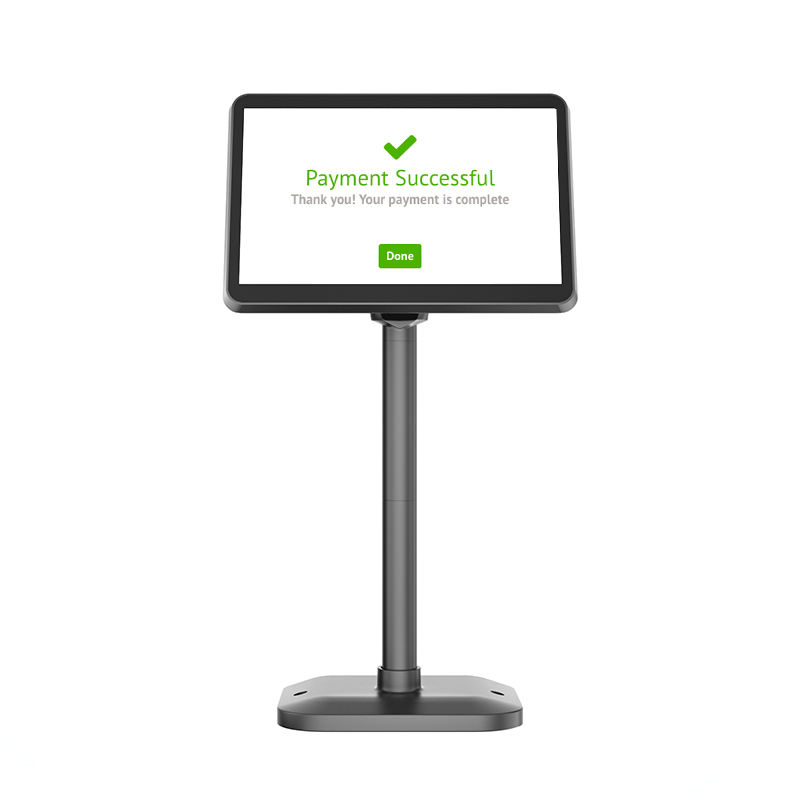

Pole LCD Customer Display 10.1 Inch IPS POS-CD10H

POS-CD10H: 10.1″ IPS customer display with HDMI input

  • 1280 x 800 IPS panel. 430 cd/m², 800:1 contrast, 16:10 — readable at an angle, which is where customers actually stand.
  • HDMI input, no driver. Enumerates as a standard second monitor on any host with a spare video output. Nothing to install, nothing to break after an OS update.
  • Pole mount, 350° horizontal / 60° vertical. Fits countertops from 20–60 cm; set it to the customer’s eye line rather than the cashier’s.
  • 50,000-hour backlight. An installation item, not a consumable — no OS, no app, no boot sequence.
  • Display-only by design. No touch layer, so a customer cannot interrupt a tender from that side.
Contact a DcaPOS Pos Expert Now !

If you want more information of our industry and products,please contact us.
Get to Know Us Now

Description

Three Ways to Show a Customer the Total

Customer-facing displays come in three technologies, and buyers often compare them on price without noticing that they are not the same product:

  • VFD pole displays — two lines of characters, usually 20 × 2. Cheap, bright, and limited to a number and a word.
  • USB secondary displays — a small LCD driven by a vendor protocol or a virtual-screen driver. Richer content, but the POS software has to support that specific display.
  • HDMI displays — a normal monitor on a pole. Anything the host can render, the customer can see, with no driver and no protocol.

The POS-CD10H is the third type: a 10.1-inch IPS panel at 1280 × 800 with an HDMI input, a 350° horizontal and 60° vertical adjustable pole mount, 430 cd/m² brightness, and a 50,000-hour backlight rating.

What HDMI Changes About the Installation

An HDMI display is not a peripheral in the POS sense. It is a screen, and the operating system treats it as one. That produces two consequences, one good and one that has to be planned for:

  • No driver, no SDK, no vendor library. Plug it into any host with a spare HDMI output — Windows terminal, Android box, mini PC — and it lights up. Nothing to install, nothing to break after an OS update, nothing that only works with one POS vendor’s software.
  • The host must have a second video output, and the software must use it. This is the part that gets missed. An all-in-one POS terminal with a single HDMI port cannot drive both a second screen and something else. And the POS application has to be able to open its customer view on the second display — in extended mode, not mirrored.

If the terminal has no spare output, the honest answer is a USB display or a VFD, not this product. If it does, HDMI is the most future-proof of the three: the display will still work with whatever terminal you buy in five years.

Panel Quality: Why IPS Matters at a Counter

The panel is 10.1 inches diagonal, 1280 × 800, 16:10, IPS, 16.7 million colours, 800:1 contrast, 35 ms response, at 430 cd/m². The numbers that matter in a real counter:

  • IPS viewing angles. A customer does not stand directly in front of the display — they stand at an angle, leaning in, sometimes from the side while the cashier works. A TN panel washed out at 45° is the usual reason a customer display goes unread; IPS holds colour and contrast across the counter.
  • 430 cd/m². Bright enough to stay readable under downlights and in a window-facing store, which is where most 250-nit panels fail.
  • 1280 × 800 on 10.1 inches. Roughly 150 ppi — text at the size a customer reads from 50 cm is sharp, and there is room for an item list, a total, a QR code and a promotion on one screen without crowding.
  • 16:10 aspect. Slightly taller than 16:9, which is the better shape for a vertical list of order lines.

The Pole: Adjustment Is the Feature

The mount adjusts 350° horizontally and 60° vertically, and fits countertops from roughly 20 to 60 cm in height. That range is what makes one SKU usable across a chain with different counter designs:

  • Height sets the display to the customer’s eye line rather than the cashier’s. A display mounted at cashier height is looked at from below all day.
  • Horizontal rotation lets the same unit serve a queue that approaches from the left in one store and the right in another — or be turned toward the cashier at closing time.
  • Vertical tilt compensates for the customer standing closer or further from the counter.

Cable lengths are 1.5 m for the display signal and 2 m for power. In a counter installation that is usually enough, but plan the routing: an HDMI cable pulled tight across a drawer opening is a cable that fails within a year.

Reliability and Running Cost

The LED backlight is rated at 50,000 hours. Left on for twelve hours a day, that is over eleven years; on continuously, about five and a half. In practice the display outlives the terminal it is attached to, which is the point — a customer display is an installation item, not a consumable.

Power is 12 V / 3 A through an external adapter. Because the unit is a monitor rather than a smart device, there is no OS to update, no app to crash and no boot sequence: it comes up with the host’s signal and goes dark when the host sleeps. For an unattended installation that simplicity is worth more than any feature list.

Making a Display-Only Screen Useful

Because the host renders whatever it wants, the content is limited only by software. Three patterns work well at a counter:

  • The transaction view. Order lines, modifiers, total, payment QR. The core use, and the reason most buyers order it.
  • The promotion loop. Between transactions, a full-screen image or video of a bundle, a seasonal item or a membership offer. Driven by the host — a browser in kiosk mode is enough if the POS cannot do it natively.
  • The queue and status board. Order number, preparation status, pickup ready. Useful in food service, where the customer looks at the screen while waiting rather than at the moment of payment.

What it cannot do is accept input. There is no touch layer, which is the right decision for a public screen: nobody can interrupt a transaction from the customer side, and there is no touch surface to wear out or clean between customers.

Where the CD10H Fits

  • Retail counters — item list and total at the customer’s eye line.
  • Restaurants and cafés — order confirmation, queue numbers, promotion between orders.
  • Pharmacy and clinic counters — where the customer needs to read and confirm a charge.
  • Hotel and service desks — charges, signatures, offers, in a setting where a paper slip looks unfinished.
  • Not for hosts without a spare video output — check the terminal first. A single-output all-in-one cannot drive this and anything else at the same time.

Frequently Asked Questions

Does it connect by USB?

No. This model takes an HDMI input and is driven as a second monitor. USB secondary displays are a different product category with a different driver model — do not order this one expecting USB.

Will it work with my POS software?

If your POS can render a customer view on a second display, yes. If it cannot, the screen can still run a promotion loop from a browser or a simple viewer, but the transaction view needs software support.

Does it need a driver?

No. It enumerates as a standard monitor. The host needs a spare HDMI output and the OS needs to treat it as an extended display.

Can the customer interact with it?

No — there is no touch layer. It is a display for the customer to read, which also means nobody can interfere with a transaction from that side.

How bright is it?

430 cd/m², which is comfortable under indoor downlights and usable in a window-facing store. It is not an outdoor display.

What is included?

The display, pole mount, HDMI cable (1.5 m), power adapter and power cable (2 m).

Next step: tell us the host terminal and how many video outputs it has, the counter height, and whether your POS software can render a customer view — we will confirm the configuration and quote factory-direct. Email sales@dcapos.com or contact us.

Related: PD220V-II VFD display · POS peripherals · POS-CD7A 7-inch customer display · VFD220 pole display · POS systems

Part No.
POS-CD10H
Series Type
PD101 Series
Interface
HD-MI
VGA (optional)
Power Supply
12V 3A
Horizontal Adjustable Angle
350 degrees
Vertical Adjustable Angle
60 degrees
Display Cable Length
1.5m
Power Cable Length
2m
Display Size
10.1 inch (diagonal)
Display Technology
IPS
Number of Pixels
1280 pixels (H)* 800 pixels (V)
Active Area
216.96 mm (H)* 135.6 mm (V)
Display Ratio
16: 10
Response Time
35ms
Display Colors
16.7M
Contrast Ratio
800:1
Backlight Brightness
430 cd/m2

First time specifying a 10.1-inch pole display? Read VFD or pole LCD before you pick a screen height, then what a POS system is made of to see where the display is driven from.

Get a Quote Now!

Related Products

As a professional POS hardware manufacturer in China, we provde OEM/ODM POS service.

DcaPOS-POS Hardware Manufacturer

+86 133 1295 3271
Furong Lantian Industrial Park, Xinqiao,Shajing Town,Shenzhen China.
Contact Us Now