If you want more information of our industry and products,please contact us.
Get to Know Us Now
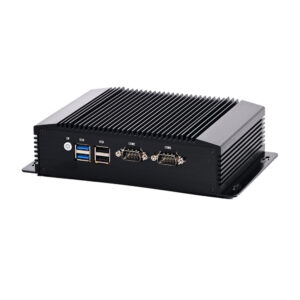
Most mini PCs are specified on CPU and memory. An industrial PC is specified on what it can connect to, and by that measure the DCA-M400 is a different category of device: six DB9 COM ports on the rear panel, four of them configurable as RS422 or RS485, plus a Phoenix terminal that extends another six RS232 channels — twelve serial ports in total — alongside a 7-in / 7-out GPIO header.
That is the specification of a machine controller, not a desktop computer. It is what you need when the equipment in the building was built before Ethernet.
Serial survives because it is simple, deterministic and optically isolated when it needs to be. The devices that use it are not going away:
A USB-to-serial adapter works, until it does not: adapters drop under sustained load, change COM numbers after a reboot, and add a driver dependency to an appliance that should not have one. Twelve native ports remove that class of problem entirely, and RS485 on four of them lets a single port address a bus of devices rather than one.
RS422 and RS485 matter specifically because they are differential: they run hundreds of metres in an electrically noisy environment where RS232 manages fifteen. In a factory or a refrigerated warehouse, that difference is the reason a controller is installed in a cabinet rather than next to the machine.
The GPIO header provides seven inputs and seven outputs. On an industrial PC this is how the computer stops being a computer and becomes part of the machine:
Without GPIO, that job goes to a separate PLC or a USB I/O module — another device, another power supply, another protocol. A 7/7 header covers a surprising amount of machine logic: start and stop, a safety interlock, a stack-light, and half a dozen sensors.
This is the unusual part of the specification: the platform is offered across ten generations of Intel Core processors, from a 4th-generation i5-4278U up to a 12-core i7-1260P.
Why that matters commercially rather than technically:
The consequence for a buyer is that the CPU is a configuration choice rather than a fixed specification — which is why the memory type varies with it (DDR3L for 4th generation, DDR4 for 6th to 11th, DDR5 in the later generations) and the storage slot differs (mSATA on 4th generation, M.2 NVMe from 6th onward).
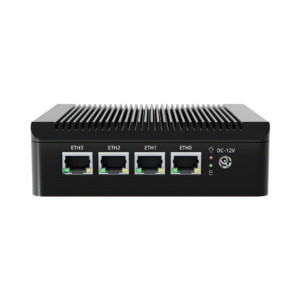
Networking is 2 × Intel i210/i219 plus 2 × Intel i226V 2.5 GbE, and on 11th to 13th generation CPUs it becomes 4 × Intel i226V. All Intel controllers, all with in-kernel driver support.
For a device that may sit between a machine network and an office network, four ports on independent controllers means physical segmentation without a managed switch — the same argument as on the smaller M200, at a higher performance tier.
The input is a 3-pin Phoenix terminal accepting 9–36 V DC, with a recommended 12 V / 5 A supply for 4th–8th generation builds and 19 V / 4.74 A for 10th–13th. The AC adapter is 100–240 V.
The wide DC range is the specification that makes vehicle and plant installation possible: a 12 V vehicle system actually swings between 11 and 14.5 V, a 24 V industrial system between 19 and 29 V, and both produce transients well outside that. A fixed 12 V input device fails on the first cold start or load dump; a 9–36 V input absorbs it.
Two further details belong to the same story. The ATX/AT quick switch selects between soft power-on and power-on-with-supply, which is what an unattended machine needs after a power cut. And the Phoenix terminal connector is a screw-down block rather than a barrel jack, because a barrel jack in a vibrating environment falls out.
248 × 150 × 83 mm in an aluminium alloy body, 2.2 kg net and 3.5 kg gross. Operating range −20 to 60 °C, storage −20 to 70 °C, 10–90% RH at 30 °C non-condensing.
−20 °C operation is the number that separates this from a commercial mini PC. It is what allows installation in a cold store, an unheated plant room or an outdoor cabinet — and it comes from the combination of an aluminium case as heatsink, industrial-grade components and no fan to seize.
Remaining I/O: 1 × VGA, 1 × HDMI, 4 × USB 3.0, 2 × USB 2.0, 1 × PS/2 combo, mic and speaker jacks, an embedded SIM slot for 3G/4G, a reset button and a CMOS clear button. The BIOS is American Megatrends.
Six DB9 ports on the rear panel, four of which support RS422/RS485, plus a Phoenix terminal that extends six more RS232 channels — twelve in total.
Yes. The input accepts 9–36 V DC on a screw terminal, which covers 12 V and 24 V systems including their transients.
Seven inputs and seven outputs for switches, sensors, relays, lamps and interlocks — machine control without a separate PLC or I/O module.
A 15 W part for a controller running one application; a 28 W i7 or the 12-core i7-1260P for vision, video walls or multiple concurrent workloads. Older generations are significantly cheaper.
Yes — DDR3L on 4th generation, DDR4 on 6th to 11th, and DDR5 on the later generations. Storage is mSATA on 4th generation and M.2 NVMe from 6th onward.
One year. OEM/ODM configuration of CPU, port layout, logo and system image is available — ask at quotation stage.
Next step: send us the device list you need to connect (port types and count), the supply voltage and the operating environment — we will specify the CPU generation and confirm a factory-direct quote. Email sales@dcapos.com or contact us.
Related: DCA-M200 fanless mini PC · DCA-M100 mini PC · industrial mini PC range · POS systems
|
Product Name
|
Powerful Industrial Mini PC DCA-M400
|
||
|
CPU
|
1. Intel Core i5-4278U 2.6GHz Max 3.1GHz Dual Cores Four Threads 3MB cache TDP 28W Intel Iris Graphics 5100.
|
||
|
2. Intel Core i7-4578U 3.0GHz Max 3.5GHz Dual Cores Four Threads 4MB cache TDP 28W Intel Iris Graphics 5100.
|
|||
|
3. Intel Core i3-6157U 2.4GHz Dual Cores Four Threads 3MB cache TDP 28W Intel Iris Graphics 550.
|
|||
|
4. Intel Core i5-7267U 3.1GHz Max 3.5GHz Dual Cores Four Threads 4MB cache TDP 28W Intel® Iris® Plus Graphics 650.
|
|||
|
5. Intel Core i7-7560U 2.4GHz Max 3.8GHz Dual Cores Four Threads 4MB cache TDP 28W Intel® Iris® Plus Graphics 640.
|
|||
|
6. Intel Core i5-8259U 2.3GHz Max 3.8GHz Quad Core Eight Threads 6MB cache TDP 15W Intel® Iris® Plus Graphics 655.
|
|||
|
7. Intel Core i7-8560U 1.9GHz Max 4.2GHz Quad Core Eight Threads 8MB cache TDP 15W Intel® UHD Graphics 620.
|
|||
|
8. Intel Core i5-10210U, 6M Cache, 1.6GHz up to 4.20GHz Quad Cores 8 Threads TDP 15W Intel® UHD Graphics
|
|||
|
9. Intel Core i7 10610U, 8M Cache, 1.8GHz up to 4.90GHz Quad Cores 8 Threads TDP 15W Intel® UHD Graphics
|
|||
|
10. Intel Core i5-1135G7, 8M Cache, 2.4Ghz up to 4.2GHz Quad Cores 8 Threads TDP 15W Intel Iris Xe Graphics
|
|||
|
11. Intel Core i7-1195G7, 12M Cache, 2.9GHz up to 5.0GHz Quad Cores 8 Threads TDP 15W Intel Iris Xe Graphics
|
|||
|
12. Intel Core i5-1235U 1.3GHz up to 4.4GHz 10 Cores 12 Threads 12MB cache TDP 15W Intel Iris Xe Graphics
|
|||
|
13. Intel Core i7-1255U 1.7GHz up to 4.7GHz 10 Cores 12 Threads 12MB cache TDP 15W Intel Iris Xe Graphics.
|
|||
|
14. Intel Core i7-1260P 2.1GHz up to 4.7GHz 12 Cores 16 Threads 18MB cache TDP 28W Intel® Iris® Xe Graphics eligible
|
|||
|
BOIS
|
American Megatrends Inc
|
||
|
RAM
|
1 x SO-DIMM DDR3L Slot Support 4GB/8GB (for 4th gen)
2 x SO-DIMM DDR4 Slot Support 4GB/8GB/16GB/32GB (for 6-11th gen)
2 x SO-DIMM
DDR5 Slot Support 8GB/16GB/32GB/64GB (for 12-13th gen) |
||
|
SSD
|
1 x M-SATA3.0 slot for MSATA SSD, support 6Gb/s(4th only)
1 x M.2 slot for NVME 2280 SSD, support 6Gb/s(6/7/8/10/11/12/13th gen)
1 x SATA3.0 slot for SATA HDD or SSD, , support 6Gb/s
|
||
|
Video Card
|
refer to the cpus
|
||
|
Ethernet
|
2*Intel i210/i219+2*Intel(R) i226V (11-13th cpu support 4*intel i226V)
|
||
|
Switch
|
1 x Power On/Off Switch
|
||
|
Power
|
1 x 3pin phoenix terminal power supply input, support 9~36V
|
||
|
Button
|
1 x ATX/AT quick switch
|
||
|
PS/2
|
1 x PS/2(keyboard and mouse 2 in 1)
|
||
|
USB
|
4 x USB3.0, 2 x USB2.0
|
||
|
Display
|
1 x VGA, 1 x HDMI
|
||
|
LAN
|
2 x Intel (i210+i219) +2 x Intel i226V 2.5G (11-13th cpu support 4*intel i226V)
|
||
|
Audio
|
1 x MIC, 1 x SPK
|
||
|
COM
|
6 x DB9 COM(4xCOM support RS422/RS485)+Phoenix Terminal extend 6 x RS232
Total support 12 COM Ports |
||
|
GPIO
|
1 x GPIO( 7pin input, 7pin output)
|
||
|
SIM
|
1 x embedded SIM card slot onboard support 3G/4G network
|
||
|
Others
|
1 x Reset, 1 x CMOS clear bution, 1 x 2pin Phoenix terminal power supply input
|
||
|
Input
|
DC100-240V AC/50-60Hz
|
|||
|
Output
|
DC +9V~+36V, recommend 12V/5A(4-8th), 19V-4.74A(10-13th)
|
|||
|
Operating Temperature
|
-20/+60 Centigrade
|
|||
|
Storage Temperature
|
-20/+70 Centigrade
|
|||
|
Relative Humidity
|
10%~90%@30 Centigrade (non-condensing)
|
|||
|
Size
|
248 x 150 x 83 mm
|
|||
|
Weight
|
NW 2.2KG, GW 3.5KG
|
|||
|
Shell
|
Aluminum alloy body
|
|||

First time specifying a fanless industrial mini PC? Read what a POS system is made of before you treat the computer as a commodity, then how one sale moves through the till to see what the box has to keep up with.