


If you want more information of our industry and products,please contact us.
Get to Know Us Now
Most mini PCs give you two display outputs, and on industrial models one of those is usually VGA. Three independent digital outputs — 2 × HDMI plus 1 × DisplayPort — on a fanless aluminium chassis is a much narrower product category, and it exists for a specific reason: multi-screen work in retail and light industrial rarely has room for three separate PCs, three power adapters and three cable runs.
The DCA-M300 is built on the Intel Celeron J6412 platform with all three outputs active simultaneously. The jobs are concrete. A till with its own operator screen, a customer-facing display at the counter, and a kitchen or back-of-house screen — three screens, one box, one power lead. A digital signage player driving a menu board, a promotion panel and a window display from a single media library. A workstation where the operator needs the application, a drawing or spec sheet, and a live camera or sensor feed at the same time, without alt-tabbing between them.
The usual workaround for a three-screen job is one small PC plus two USB display adapters. It works, and then it stops working in ways that are hard to diagnose. USB graphics pushes the frame composition onto the CPU and the USB bus, so a menu board playing video stutters while the till is busy. Refresh rate and colour handling differ between the native output and the USB ones, so the same promotion looks different on the window display. Driver stacks have to match the OS, which rules out some Linux builds entirely. And on resume from power loss — the normal state of affairs for an unattended signage box — the USB displays enumerate in a different order and land on the wrong screens.
Native outputs do not have any of those failure modes. Three outputs on the SoC means the display controllers are on the same silicon as the CPU: one driver, one enumeration order, identical colour pipeline on all three. For an unattended installation, that difference is worth more than the frame rate.
Both are 10-watt-class quad-core Celerons with no fan, and on a receipt-and-inventory workload you will not feel the difference. The J6412 is a newer generation on a smaller process, with a higher-IPC core, faster memory support and PCIe 3.0 instead of 2.0, so sustained multi-tasking — decoding video to two screens while a browser runs a dashboard on the third — sits at a lower CPU percentage and therefore a lower chassis temperature.
What it is not is an i3. If your application is a browser-based ERP with a heavy JavaScript front end, or you want to run several virtual machines, the Celeron will be the bottleneck and no amount of RAM will fix it. For POS software, signage players, KDS clients, kiosk shells and serial-connected machine monitoring, it is comfortably enough — and it stays fanless, which is the point.
Consumer mini PCs are rated 0 °C to 40 °C, and that rating assumes a fan pulling room air through the case. The DCA-M300 is rated −20 °C to 65 °C, fanless, in an aluminium body that acts as the heat spreader.
The 65 °C ceiling is the number that matters for selection. An un-airconditioned commercial kitchen in summer, a sealed cabinet under a counter, a sunlit shop window — these are all locations where the ambient air passes 45 °C for hours at a time. A consumer unit in that position does not fail outright; it thermally throttles. The symptom is a menu board that stutters in the afternoon, or a till that takes four seconds to respond after lunch, and it reads like a software problem for weeks before anyone puts a thermometer in the cabinet. If you cannot guarantee the installation stays under 45 °C, the wider rating is not a marketing figure — it is the reason to choose this chassis over a cheaper one.
The DCA-M200 uses mSATA storage; the DCA-M300 uses M.2 2280 NVMe. On paper that is a sequential read jump from roughly 500 MB/s to the 1,500–2,000 MB/s class, which for this workload mostly shows up as faster boot and faster application launch rather than faster transactions.
The reason it matters commercially is supply. M.2 2280 is the form factor the entire consumer and industrial market builds for, so drives are cheap, stocked everywhere, and available in any capacity from 128 GB up. mSATA has been winding down for years. For an exporter supporting installations across several countries, the question is not what the drive does on day one but whether the customer can buy a replacement in year three without importing from you. On that measure, 2280 is the safer socket to be committed to.
The two RS-232 ports are driven from a level shifter on the board, not through a USB-to-serial chip. That matters if you are connecting a scale, a customer display, a label applicator or a legacy PLC: native UARTs hold their timing under load, whereas USB bridges drop characters when the bus is busy with storage traffic.
Fanless also removes a maintenance item that is easy to overlook in a specification: no filter to clean. A fan-cooled industrial PC pulls air through the case, which means it also pulls in flour, oil vapour and packaging dust, and the filter needs a cleaning schedule or the machine cooks itself. The M300 has no intake path at all, so it can be closed inside an enclosure with nothing but clearance around the fins.
The unit runs on a DC 12 V / 3 A adapter — a 36 W supply for a machine that typically draws a fraction of that, which leaves headroom for a USB accessory or two. Adapters are supplied for US, JP, CN, AU, UK and EU plugs, so a single SKU covers most export destinations.
Customers regularly ask whether it can be fitted to a vehicle. The honest answer is: not directly off the vehicle’s 12 V bus. A vehicle electrical system is nominally 12 V but runs 13.8–14.4 V while charging, sags to 9 V or lower during cranking, and can produce load-dump transients of tens of volts when a heavy load disconnects. A fixed 12 V input will not survive that. If the installation is mobile, use an isolated DC-DC converter between the bus and the terminal, or specify the DCA-M400, which accepts 9–36 V directly and is the model built for that environment.
The chassis supports VESA mounting, wall mounting and desktop use — the same body works bolted to the back of a monitor, screwed to a cabinet wall, or sitting on a shelf. Because there is no fan and no intake, orientation is not restricted: there is no preferred airflow direction to respect.
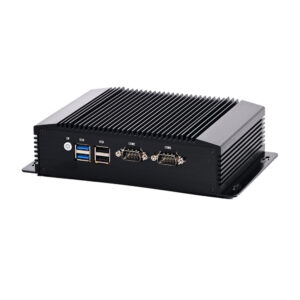
The port complement is deliberately modest: 2 × USB 3.0 and 2 × USB 2.0 for scanner, printer, keyboard and a licence dongle, 2 × RS-232 for the peripherals that need them, and the three display outputs. There is no Ethernet port on this chassis at all — not one port, and not a four-port array — which is covered in its own section below because it is the single specification that decides whether this model suits your installation.
This is the detail that catches buyers out, so it is worth stating plainly: the J6412 chassis has no Ethernet port. The board puts its I/O budget into three video outputs and two native serial ports, and the RJ45 did not make the cut.
For most of the jobs this machine is sold into, that is a solvable problem rather than a blocker. A USB 3.0 to Gigabit adapter costs a few dollars, needs no driver on Windows 10 or any current Linux kernel — the common Realtek and ASIX chipsets are both in-tree — and reaches close to line rate, because the limit is the USB 3.0 bus rather than the adapter. It occupies one of the two USB 3.0 ports, leaving the other for storage and the two USB 2.0 ports for scanner, printer and dongle. A USB Wi-Fi adapter is the other route, and for a signage player streaming stills or a kitchen client pulling tickets, wireless is genuinely sufficient.
There are three cases where this stops being an inconvenience and becomes a real constraint. First, network boot: PXE and Wake-on-LAN both require a native NIC, and a USB adapter provides neither, so a fleet that is re-imaged over the network cannot use this chassis. Second, VLAN trunking or link aggregation on a single physical port — if your network design assumes an 802.1Q trunk to the terminal, you need the M200. Third, locked-down sites where no external USB device is permitted for security or tamper reasons.
The traffic argument is worth putting in proportion, because it cuts against the instinct to over-specify. A POS terminal exchanging tickets and price lookups moves kilobytes per transaction, not megabytes. A menu board pulling a new video file once a week is a burst of a few hundred megabytes. None of that needs 2.5 GbE, and a USB Gigabit adapter carries all of it without becoming the bottleneck. The four-port M200 exists for a different job: routing, firewall rules and multiple network segments — a box that sits between networks rather than on one.
If native Ethernet is a hard requirement for your deployment, say so when you enquire and we will point you at the DCA-M200 or the DCA-M400 rather than ship this chassis and let you find out at commissioning.
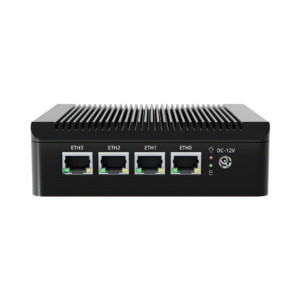
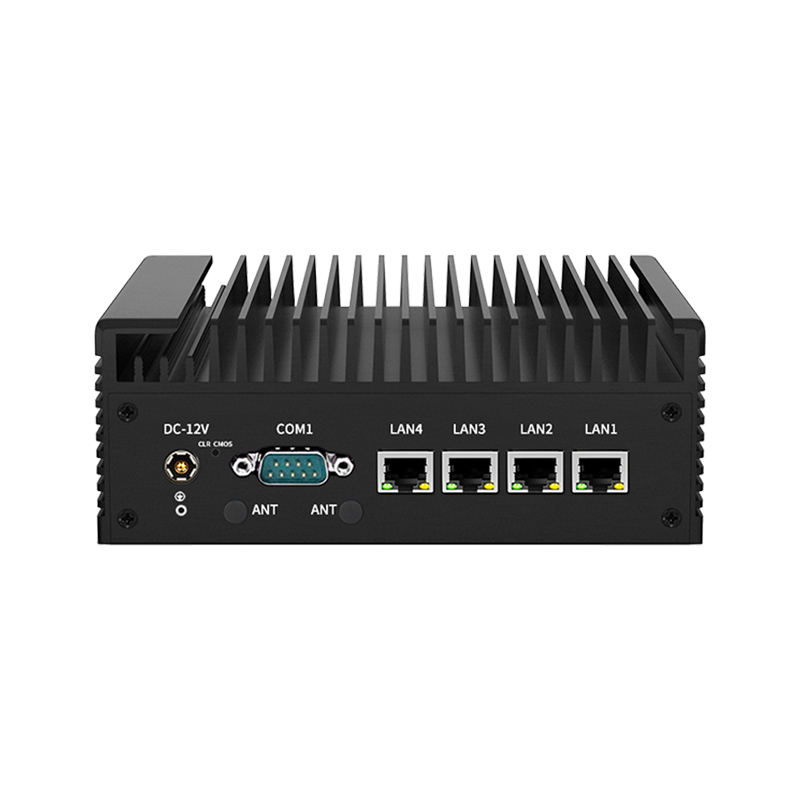
Two fanless Celeron boxes, two different jobs:
If you are unsure which of the four fits, send the port list and the ambient temperature at the install site and we will tell you which chassis it maps to — including when the answer is that none of them do.
No. The J6412 chassis has no RJ45 port. A USB 3.0 to Gigabit adapter covers a wired connection for normal terminal and signage use, and a USB Wi-Fi adapter covers wireless, but neither supports PXE boot or Wake-on-LAN. If native Ethernet is required, specify the DCA-M200.
No. There is no native NIC to route between, and a USB adapter cannot supply the second network segment. The DCA-M200 carries four Intel 2.5 GbE ports and is the correct choice for pfSense, OPNsense or OpenWRT builds.
Yes. The 2 × HDMI and 1 × DisplayPort outputs are independent and can run three separate extended desktops, or mirror any combination of them in the OS display settings.
No. The platform is rated to 16 GB maximum across the SODIMM slot, and 4 GB, 8 GB and 16 GB configurations are available at order. If your application needs more, the DCA-M400 takes Core i3/i5/i7 with a higher ceiling.
Windows 10, Windows 8 / 8.1 and Linux are the supported options. The Celeron J6412 is not on Intel’s or Microsoft’s officially supported processor list for Windows 11, so a Windows 11 install is unsupported even where it boots. For long-life deployments we recommend Windows 10 IoT LTSC or a Linux build.
Well under the 36 W adapter rating in normal POS or signage use, which is why the unit runs cool enough to stay fanless and why a small UPS will carry it through a short outage.
It needs airflow over the fins, but no intake filter and no particular orientation. Inside a closed cabinet, leave a few centimetres of free air on the finned faces and keep the ambient temperature under the 65 °C rating.
One year, with OEM/ODM available: CPU and memory configuration, port population, chassis colour, logo, packaging and pre-loaded operating system can all be specified at order.
|
Model Number
|
DCA-M300
|
|
Processor
|
Intel Celeron J6412, 4 Cores 4 Threads
|
|
Graphics
|
Intel UHD Graphics, integrated
|
|
Memory
|
SODIMM DDR4 2133 / 2400 MHz — 4 GB, 8 GB or 16 GB, max 16 GB
|
|
Storage
|
1 × M.2 2280 NVMe SSD — 128 GB, 256 GB, 512 GB or 1 TB
|
|
Display Output
|
2 × HDMI + 1 × DisplayPort, three independent displays
|
|
USB
|
2 × USB 3.0 + 2 × USB 2.0
|
|
Serial
|
2 × RS-232, native UART
|
|
Ethernet
|
None — this J6412 chassis has no RJ45 port at all; the four-port 2.5 GbE platform is the DCA-M200
|
|
Power Input
|
1 × DC-IN 12 V
|
|
Power Adapter
|
DC 12 V / 3 A
|
|
Plug Type
|
US / JP / CN / AU / UK / EU
|
|
Cooling
|
Fanless, zero noise, chassis as heat spreader
|
|
Material
|
Aluminium alloy case
|
|
Installation
|
VESA / wall-mounted / desktop
|
|
Operating Temperature
|
−20 °C to 65 °C
|
|
Operating System
|
Windows 10, Windows 8 / 8.1, Linux
|
|
Certification
|
CE, RoHS, FCC, 3C
|
|
Warranty
|
1 year
|
|
OEM/ODM
|
Yes — CPU, memory, storage, ports, logo, colour, packaging and pre-loaded OS
|


Related: DCA-M100 fanless mini PC · DCA-M400 industrial PC · DCA-M200 quad-LAN mini PC
First time specifying a fanless industrial mini PC? Read what a POS system is made of before you treat the computer as a commodity, then how one sale moves through the till to see what the box has to keep up with.