Restaurant ordering has changed quickly in recent years.
Customers are more comfortable ordering through digital screens.
Restaurants are facing rising labor costs.
Fast-service brands are looking for ways to improve efficiency while keeping customer experience smooth.
Because of this, more restaurants are installing self-ordering kiosks.
From quick-service restaurants and cafés to bubble tea chains and food courts, self-service kiosks have become a practical part of restaurant operations.
For restaurant owners, POS software companies, and distributors, the question is no longer whether self-ordering kiosks are becoming popular.
The question is how to choose the right kiosk hardware for long-term business use.
In this guide, we’ll explain how restaurant self-ordering kiosks work, what benefits they offer, and what to look for before buying in 2026.
What Is a Self-Ordering Kiosk for Restaurants?
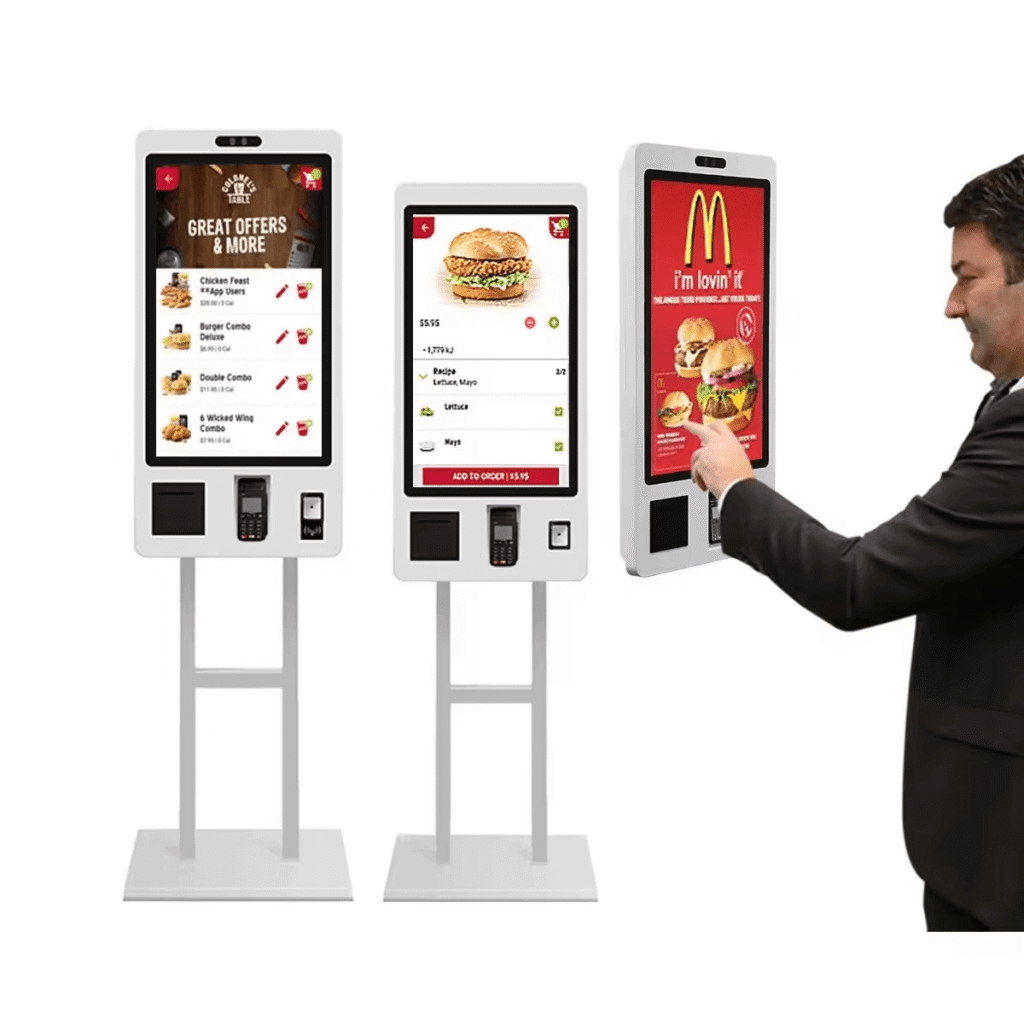
A self-ordering kiosk is a touchscreen ordering terminal that allows customers to place and pay for orders directly without waiting for cashier assistance.
Customers can:
- browse menu
- customize items
- select add-ons
- apply promotions
- pay digitally
- receive pickup number
- collect order
Restaurant staff then focus on:
- food preparation
- kitchen workflow
- order delivery
- customer support
Instead of manually entering every order.
That improves efficiency.
Especially during busy periods.
Why Restaurants Are Using Self-Ordering Kiosks
Restaurants need faster operations.
Customers also expect speed.
A self-ordering kiosk helps restaurants manage both.
Key reasons restaurants adopt kiosks:
- reduce queue time
- improve order accuracy
- reduce labor pressure
- increase upsell opportunities
- improve checkout speed
- standardize ordering workflow
- support contactless payment
For high-traffic restaurants, even a small improvement at checkout can make a visible difference.
Main Benefits of Self-Ordering Kiosks
1. Faster Customer Ordering
A cashier can only handle one order at a time.
A kiosk allows customers to order directly.
This helps reduce waiting time.
Especially during:
- lunch rush
- dinner peak
- weekend traffic
- takeaway hours
Customers often move faster when ordering visually.
That improves flow at the counter.
2. Better Order Accuracy
Restaurant orders often include customization:
- extra cheese
- no onion
- combo upgrades
- drink selection
- dessert add-ons
A touchscreen makes these options easy to review before payment.
Customers confirm details themselves.
That reduces mistakes.
Fewer mistakes means fewer remakes.
3. Higher Average Order Value
Self-order kiosks are strong upsell tools.
The screen can recommend:
- combo meal
- dessert
- drink upgrade
- side dish
- premium toppings
Example:
“Add fries for $2”
“Upgrade to large size”
“Try today’s special dessert”
Customers often accept visual upsell suggestions.
That increases average ticket value.
4. Reduced Labor Pressure
Restaurants still need staff.
But kiosks reduce pressure at front counter.
Staff spend less time entering orders.
More time goes to:
- kitchen preparation
- pickup management
- customer support
For growing restaurants, this improves overall workflow.
5. Better Customer Experience
Many customers already expect digital ordering.
Especially younger customers.
A self-order kiosk provides:
- clear menu photos
- customization options
- quick payment
- loyalty signup
- digital receipt
That creates a modern restaurant experience.
Which Restaurants Benefit Most?
Self-ordering kiosks are flexible.
Different restaurant types use them differently.
Quick-Service Restaurants
Very common for:
- burger restaurants
- fried chicken
- takeaway chains
- pizza chains
Useful for:
- queue reduction
- combo upselling
- fast checkout
Coffee Shops
Helpful for:
- repeat ordering
- breakfast rush
- loyalty signup
- pastry upsell
Customers can quickly choose:
- latte
- milk type
- extra shot
- bakery combo
Bubble Tea Shops
Very practical for:
- sugar level
- ice level
- toppings
- drink size
Customization becomes clearer.
Queues move faster.
Food Courts
Food court kiosks help with:
- fast ordering
- queue management
- multilingual menus
- digital payment
Very useful in high-traffic locations.
Key Features to Look for Before Buying
Screen Size
Popular options:
- 21-inch
- 24-inch
- 27-inch
- 32-inch
Choose based on:
- restaurant space
- menu complexity
- customer traffic
Large screens look premium.
But size should match the real store layout.
Android OS Compatibility
Android kiosks are popular because they offer:
- easy software deployment
- flexible customization
- OTA updates
- lower hardware cost
- SDK support
For POS software companies, Android reduces deployment complexity.
Touchscreen Performance
Customers interact directly.
Touchscreen should feel:
- responsive
- accurate
- smooth
Slow touch response creates frustration quickly.
Payment Integration
Restaurants increasingly support:
- QR payment
- NFC tap
- Apple Pay
- Google Pay
- bank card
Fast payment improves queue flow.
Printer & POS Connectivity
Restaurant kiosks often connect with:
- thermal printer
- kitchen printer
- POS backend
- customer queue system
- loyalty system
Stable connection matters.
Custom Branding
For restaurant chains and software partners:
Useful options include:
- logo printing
- screen UI customization
- enclosure color
- software integration
This matters for brand consistency.
Self-Ordering Kiosk vs Traditional Cashier POS
Quick comparison:
| Feature | Self-Ordering Kiosk | Cashier POS |
|---|---|---|
| queue reduction | strong | limited |
| upsell | strong | manual |
| order accuracy | high | depends on cashier |
| labor efficiency | stronger | lower |
| customer interaction | direct | cashier-based |
| setup cost | higher | lower |
Most restaurants now combine both.
Kiosk + cashier POS works very well.
Typical Restaurant Kiosk Cost in 2026
Approximate range:
| Hardware | Price Range |
|---|---|
| 21-inch kiosk | $800–$1200 |
| 24-inch kiosk | $1000–$1800 |
| 27-inch kiosk | $1300–$2200 |
| customized kiosk | depends on project |
Pricing depends on:
- screen size
- CPU platform
- Android version
- printer integration
- payment module
- branding
Reliable hardware matters more than lowest price.
FAQ
Is a self-ordering kiosk worth it for restaurants?
For many restaurants, yes.
It improves speed, reduces queue pressure, and helps upsell.
What size kiosk is best for restaurants?
21–27 inch works well for most restaurants.
Can restaurant kiosks support QR payment?
Yes.
Most Android kiosks support QR and digital payment.
Do cafés need self-order kiosks?
For busy cafés and chains, kiosks can improve speed and customer experience.
Final Thoughts
Restaurant customers expect faster ordering.
Restaurants need efficient operations.
Self-ordering kiosks help both.
For many restaurants in 2026, kiosks offer:
- faster ordering
- better upsell opportunities
- improved customer experience
- reduced cashier pressure
- scalable digital workflow
As restaurants continue moving toward digital ordering, self-order kiosks are becoming an important part of restaurant POS hardware strategy.
Looking for Restaurant Self-Ordering Kiosk Hardware?
DCAPOS provides Android self-order kiosk solutions for:
- restaurants
- cafés
- bubble tea shops
- QSR chains
- POS software companies
- distributors
Support includes:
- OEM / ODM customization
- Android firmware customization
- logo branding
- SDK support
- fast sample delivery
- global shipping
Contact our team to discuss your restaurant self-order kiosk project.