Square does not open cash drawers. It prints. When a cash sale completes the app sends a receipt job to the printer, and the printer pulls a solenoid for a fraction of a second through a port on its back. The drawer is the last device in that chain and the only one the software cannot address.
That explains most of what is confusing about buying a drawer for a Square counter. There is no drawer driver and no drawer setting beyond a test button. Voltage, pulse width and port all live in a printer that Square treats as a receipt printer and nothing else.
Two ways in, and only one is a device
Square supports a drawer in three shapes that collapse to two mechanisms. A USB drawer connects to the hardware hub and appears under Available Cash Drawers. A printer-driven drawer connects to the printer’s kick-out jack and appears nowhere: Square’s documentation says it will not be listed, and that the only confirmation is the Test Cash Drawer button.
The third shape is the Star Micronics mPOP, a printer and a drawer in one cabinet, which takes the USB path with an extra rule — receipts must be enabled on the printer station for the drawer to work. The documentation is blunt about the fallback, too: a drawer not connected to a receipt printer does not open automatically, and the answer is the key.
What the compatibility list actually says
The compatibility page lists eight configurations; seven lines here, because the mPOP appears twice. Read as a whitelist it looks restrictive; read carefully, two lines are not models.
| Brand | Model | Connection | What the row means |
|---|---|---|---|
| Star Micronics | CD5 | USB | The drawer Square sells as its 16-inch USB model |
| Star Micronics | CD5 | Printer-driven | Same cabinet, an interface board instead of USB |
| Star Micronics | CD4 | Printer-driven | Smaller, older, still listed |
| Star Micronics | mPOP POP10 / POP10CBi | USB / Bluetooth | Printer and drawer in one; Bluetooth is iPad only |
| APG | Vasario | USB | The only APG model tested over USB |
| APG | Other printer-driven models | Printer-driven | A category, not a model |
| Star Micronics | Other printer-driven models | Printer-driven | A category, not a model |
Those two rows are the admission. Square is saying that any printer-driven drawer from APG or Star is expected to work, because a printer-driven drawer is a solenoid and a switch and there is nothing else in it to be incompatible with. The list is short not because the hardware is narrow but because only two vendors were tested — the same lesson as the scanner list, arrived at from the other direction.
Two footnotes matter more than the table. One marks the mPOP as a combined printer and drawer; the other says an external printer is required for Square Terminal to drive a printer-driven drawer — the Terminal has no drawer port of its own.
Opening the drawer is a print job
Once the trigger is a print job, three behaviours stop looking like bugs. A printer in an error state will not kick the drawer: out of paper, lid open, cover sensor tripped, and the job never reaches the pulse. The sale completes, the drawer stays shut, and the app reports the payment rather than the print.
A station configured for order tickets only has no reason to be sent the receipt that carries the pulse. Square says this explicitly for the mPOP and it generalises: a station without receipts enabled is a station that never opens the drawer.
An Ethernet printer also inherits the network’s failure modes. A USB printer is a cable; a network printer is a cable, a switch, an IP lease and a radio link, and if any of them is down the receipt queues and the drawer waits with it. Offline mode keeps taking payments but creates no path to a printer that fell off the LAN, as the offline guide sets out.
Six pins, one of which reports nothing
The kick-out jack is a 6P6C socket, the same shell as a telephone jack and wired nothing like one. Epson’s technical reference for its receipt printers is the clearest statement of what the six pins do, and it reads as a list of what a Square setup discards.
| Pin | Signal | What it does in a Square build |
|---|---|---|
| Pin 1 | Frame ground | Cable shield, when the cable has one |
| Pin 2 | Drawer 1 drive | Pulled low to fire the solenoid; the pin that matters |
| Pin 3 | Drawer status | Switch input; the printer can read open or closed |
| Pin 4 | Supply rail | +24 V on Epson, +12 V or +24 V on others |
| Pin 5 | Drawer 2 drive | A second drawer; unused at a single till |
| Pin 6 | Signal ground | Return for the drive and the switch |
The coil sits between pin 4 and pin 2. Epson requires a solenoid of 24 ohms or more, or 1 A or less, a pulse of 100 to 300 ms, and at least four pulse widths of rest between repeats. A 24 V coil at 24 ohms draws exactly 1 A and dissipates 24 W while the pulse lasts, which is why the pulse is short.
Pin 3 is the interesting one. It is the drawer’s micro switch: Epson specifies a switch between pins 3 and 6, and some printers report drawer state in their status byte. Square’s app neither shows that byte nor asks for it. Cash drawer management is about what the till should contain, not whether the drawer is shut, so a drawer with a status switch is buying a feature this ecosystem does not read.
What you can and cannot see
The trade is not about money. It is about observability.
| What you want to know | USB drawer | Printer-driven drawer |
|---|---|---|
| Does Square see a device? | Yes, under Available Cash Drawers | No, it is not listed |
| Which model is it? | The tested model, named | Nothing in the app |
| What voltage does it need? | Irrelevant: the drawer drives its own coil | Decides the drawer you order |
| Is it open or shut? | No state field documented | Switch exists; nothing reads it |
| What does a fault look like? | A missing device | A payment with no drawer |
| Who supports it? | Square for the link, APG or Star for the part | APG or Star, per Square |
Square’s troubleshooting page confirms the asymmetry: four checks for a USB drawer — cable at both ends, hub powered, app updated, device restarted — then, for a printer-driven one, four checks and a hand-off to APG or Star. There is no log to read, because there is no device to log.
That inverts the order you would use on a PC-based till. With software that addresses the drawer directly you start at the software; on Square the software is a black box with one button, so you start at the hardware — does the printer print, does the drawer move on the test — and only then does the question become electrical. The pulse test is the same measurement either way; what changes is when you reach for the meter.
The 24 V belongs to the printer
The printer is chosen first, from a short list of models Square has profiles for, and that choice silently fixes the drawer’s voltage. The voltage is ordered, not switched, and the connector is identical either way, so a mismatch looks like a working installation until the drawer stops pulling in or cooks its coil over a few months.
The arithmetic is unforgiving. A 12 V coil on a 24 V port sees four times its rated power: it opens hard, buzzes, and the former deforms. A 24 V coil on a 12 V port sees a quarter of the rated pull: the latch twitches, releases sometimes, and stops releasing in cold weather. Neither announces itself as a voltage problem.
Which is why the order is printer first, drawer second. Our own range makes the point: the 80 mm printers with a kick-out port are 12 V / 1 A on the POS-8250 and 24 V / 1 A on the POS-8370, and the drawers are built with either solenoid, specified at order. Two printers on one counter can need two drawer versions.
The port budget, and the three that are usually gone
The printer choice also decides how many ports are left. A Stand’s hub has three, the card reader dock takes one, and a USB printer takes a second — two gone before a scanner appears, which is why the scanner guide spends so long on hub arithmetic.
| Arrangement | Hub ports used | Drawer connection |
|---|---|---|
| Stand, USB printer, printer-driven drawer | 2 of 3 | RJ11 from the printer |
| Stand, USB printer, USB drawer | 3 of 3 | USB, and no port left for a scanner |
| Register, Ethernet printer | No Stand hub | RJ11 from the printer, over the LAN |
| Terminal with its hub and a printer | One | RJ11; Terminal has no drawer port |
| iPad or Android with a reader and OTG | 1 | RJ11 from the printer |
The second row is the one to stare at. A USB drawer buys visibility and costs the last port, which on most counters is the scanner’s. A printer-driven drawer costs nothing, because it connects to the printer rather than the hub.
When the drawer has to be the USB kind
Three situations make the USB path worth its port: a counter with no receipt printer, a Terminal without its hub, and a build where a support contract requires every device to appear in the hardware list.
What it does not buy is a status reading. The drawer carries its own driver board, powered from the port and boosted to fire a 12 to 24 V coil, so the printer’s port voltage stops mattering. That is a real benefit, since it removes the most common ordering mistake. But the board presents as a trigger rather than a sensor, and the app still offers only a device entry and a test.
It also narrows the choice to four products: two USB Star models, the mPOP, and the APG Vasario. Any other drawer is a printer-driven purchase whether or not the seller calls it Square-compatible.
Sixteen inches is 406 mm
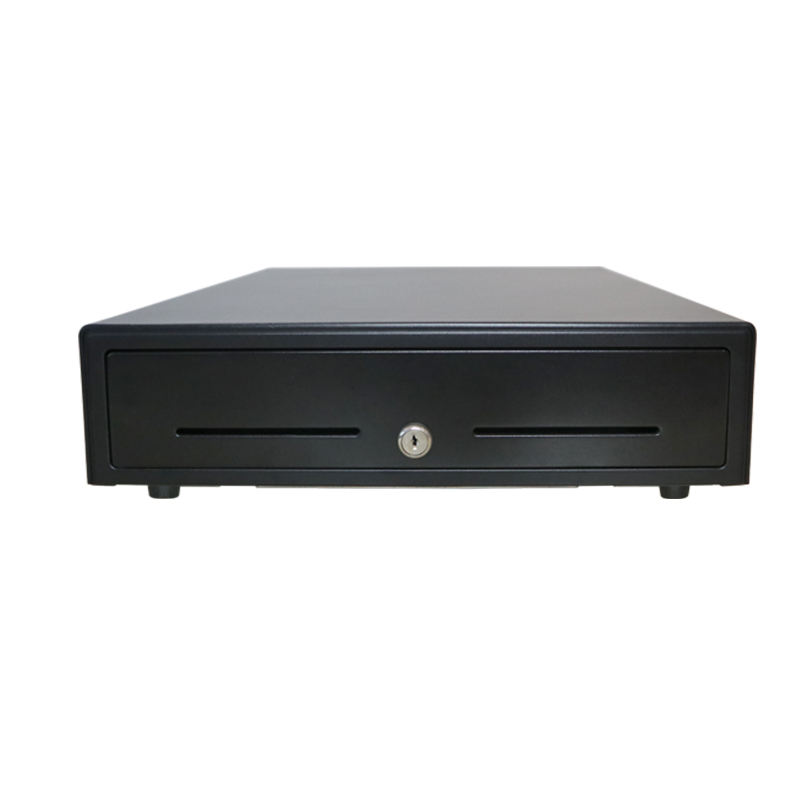
Square’s own drawer is sold as a 16-inch model, which is 406 mm. The rest of the world specifies drawers in millimetres, and the classes are close enough to be confused and far enough apart to matter in a fitted counter: sixteen inches sits between the 405 mm and 410 mm cabinets.
Width is also the least useful dimension in a small shop. What decides a fit under a counter is depth, because the counter has a front panel, a carcass and a cashier’s knees behind it. A 410 mm drawer is 420 mm deep; a 405 mm cabinet keeps that depth and gives up five millimetres of width, and a 350 mm drawer gives up 4 cm of depth as well.
None of this is Square-specific, which is the point. The drawer is the one component that owes nothing to the ecosystem: a 410 mm steel drawer rated for a million cycles does not know what software is above it, and the 24 V variant exists for the counters where the port runs at 24 V. The interface board and the cable are what make it a Square drawer, and both are replaceable parts.
What to order, in what order
- Choose the printer first, and write down two numbers from its specification: the drawer port voltage, and whether that port exists at all.
- Order the drawer’s solenoid to match. Do it in the same purchase, because the connector will not tell you afterwards.
- Buy a 6P6C drawer cable, not a telephone lead. A 4-position lead fits the socket and carries nothing on the right pins.
- Create the printer station before connecting the drawer, and enable receipts on it.
- Press Test Cash Drawer once. On the printer-driven path that button is the only diagnostic the software offers.
- Keep the key: the only way in when the printer is down, and the third lock position is how staff open a till mid-shift.
The sequence matters more than any single choice, because each step removes an option from the next. A drawer ordered before the printer is a drawer whose voltage was guessed.
Questions we get
Does any cash drawer work with Square?
Any printer-driven drawer does, provided the printer has a kick-out port and the solenoid matches its voltage. Square’s list names two categories besides the tested models, which admits that the mechanical part is not the compatibility problem. The USB path is the narrow one: four products, no category row.
Why is my drawer not listed under Available Cash Drawers?
Because it is printer-driven, and Square does not model it as a device. The list only ever shows USB drawers. A printer-driven drawer is confirmed with Test Cash Drawer and nothing else, so an empty list is normal rather than a fault.
Can I use a 12 V drawer on a 24 V printer?
No. The coil sees four times its rated power, opens violently for a while and then stops opening as the former deforms. The connector is the same, so the mistake installs cleanly. Read the printer’s specification before ordering, and if the answer is 24 V, order the 24 V drawer.
Does Square report whether the drawer is open?
The documentation describes no such field. The micro switch is wired to the printer on pins 3 and 6 and the printer can report it in its status byte, but nothing in Square’s drawer screen asks for it. If open-or-shut state matters, it has to come from somewhere other than the POS software.
What opens the drawer on a cash sale with no receipt printed?
Nothing, unless the printer station still receives the job. The pulse is emitted while the printer processes the job that carries it, so a station set to order tickets only, or a printer that has dropped off the network, leaves the drawer shut. The sale is complete; only the drawer has not been told.
Where to go next
The electrical side of the same jack is in the kick-out signal guide and the pulse test; the choice between a tablet, a terminal and a box under the counter is in the four shapes.
On a Square counter the drawer is usually the last line on the order and the only one holding cash, so it is worth matching to the printer rather than to the software. The range is in cash drawers, the printers with kick-out ports are in receipt printers, and the port voltage of any model is on its product page.
If you already have the printer and want to know which drawer version to order, send the model and a photograph of the port through the contact form. The answer is a voltage and a part number, and it is cheaper to ask than to replace a coil.
Specifying the hardware? The hardware side is covered in the POS system, by counter position — where each part sits and which of them you can stop buying separately.