A cash drawer has no processor, no feedback and no error message. It is a solenoid, a latch and a spring, and it either moves or it does not. So the useful question behind “it will not open” is not what is broken but where the voltage stopped — and the meter in the van cannot answer that, because a kick-out pulse lasts 50 to 100 milliseconds and a handheld meter averages it into a number that means nothing.
That is why drawers get replaced that were never faulty, and why a unit that clicks without travelling gets a new solenoid when the fault is a coin under the till. The order below needs one meter and settles the question in ten minutes.
Listen before you measure
Fire the drawer from the printer self-test with a hand flat on the case. A solenoid that energises makes an audible click and a small kick you can feel through the cabinet. That observation splits the fault tree before anything is unplugged, and costs less than any instrument.
| What you notice | What moved | Where the fault is | Next step |
|---|---|---|---|
| No click, no movement | Nothing | Upstream: no pulse, or no supply behind it | Measure the coil, then the cable |
| Click, no travel | The plunger pulled | Mechanical: lock position, latch or debris | Release the latch by hand and watch it |
| Moves, springs back | The latch half-released | Pulse too short, or voltage too low | Lengthen the pulse, then check the rail |
| Opens on self-test only | The whole chain | Software, or the supply under print load | Repeat the fire immediately after a print job |
Only the second row is a drawer fault in the usual sense. The first is upstream, the third is timing or power, and the fourth is neither — which is why replacing the drawer fixes none of them.
What a working pulse actually is
The port is specified on the printer datasheet, not the drawer box, and it is the number that matters. In this range the 80 mm models — POS-8250, POS-8360 and POS-8220 — specify a 12 V / 1 A drawer port, while the POS-8370 specifies 24 V / 1 A. All four use an RJ11 connector, which is exactly why the mismatch survives a visual inspection.
The pulse in numbers
Width — 50 to 100 ms in normal operation. Below about 40 ms the plunger starts to move and the pulse ends before the latch clears.
Current — 0.8 to 1.0 A, which is what a 12 to 15 Ω coil at 12 V, or a 24 to 30 Ω coil at 24 V, draws at its rated voltage.
Energy — 24 V × 1 A × 60 ms, about 1.4 J. Enough to throw a latch, not enough to heat anything if the pulse is correct.
Command — ESC p m t1 t2, with t1 and t2 in units of 2 ms and a maximum of 255, so 510 ms. The common default is 25 and 250, which is 50 ms on and 500 ms off.
Because the width is a software parameter, a drawer that buzzes and refuses to open is sometimes a configuration, not a fault. A t1 of 5 gives a 10 ms pulse: enough to make a noise, not enough to release the latch.
Why your meter reads zero on a live port
A handheld meter does not show a 60 ms pulse. It integrates over a display window of a few hundred milliseconds and shows the average of whatever fell inside it. Put 24 V through a 60 ms window inside a 200 ms sample and the display settles near 7 V; inside 400 ms it reads about 3.6 V; if the pulse lands between two samples it reads zero.
Zero is not a diagnosis
The same working port can read 0 V, 3.6 V or 7 V on three consecutive presses of the same meter. Anything between zero and eight volts is inconclusive. No printer was ever condemned correctly on the strength of a single DC reading from a kick-out port.
| Instrument | What it shows on a 60 ms, 24 V pulse | Verdict |
|---|---|---|
| Meter, DC volts | 0 to 8 V, varying with the sample window | Inconclusive |
| Meter, max or peak hold | Near 24 V, only if the peak detector is faster than the pulse | Usable on a good meter, misleading on a cheap one |
| 24 V lamp or LED tester | A visible flash | Reliable |
| Oscilloscope | A 24 V square wave, 60 ms wide | Definitive |
The cheapest reliable instrument is the drawer itself — the click test above. The second cheapest is a 24 V lamp across pins 4 and 5: it flashes on a 60 ms pulse and costs less than the postage on a returned printer.
Coil resistance, and the four states it reports
Unplug the drawer, set the meter to the 200 Ω range and measure across the drawer’s own plug, on the pair its solenoid lands on: pins 2 and 5 on most units, 4 and 5 on a drawer that returns through the supply pin. This is the one measurement a cheap meter gets right, because it is steady state rather than a pulse.
| Reading at the plug | What it means | What to do |
|---|---|---|
| Open circuit (OL) | A broken winding, or a broken lead inside the case | Coil or drawer, depending on the model |
| Under 2 Ω | Shorted turns | Replace; the port may have shut down to protect itself |
| 12–15 Ω | Healthy 12 V coil drawing 0.8–1.0 A | Measure elsewhere |
| 24–30 Ω | Healthy 24 V coil drawing 0.8–1.0 A | Measure elsewhere |
| Healthy ohms, wrong port | A 24–30 Ω coil on a 12 V port, or the reverse | The most common wrong part in the category |
Two cautions. A shorted coil reads low, not zero, and it holds the port at its 1 A limit, which some printers treat as a fault and shut the port down until power is cycled — so a port that “died” may have been protecting itself. And a coil that reads perfectly can still be seized: rust on the plunger, a deformed former or debris in the latch all measure the same as a healthy unit.
Four times, and one quarter
Voltage mismatch is the failure the connector hides, because both versions ship on the same RJ11 plug. Power in a coil follows V²/R, so doubling the voltage quadruples the power and halving it quarters the pull:
| Coil | On a 12 V / 1 A port | On a 24 V / 1 A port |
|---|---|---|
| 12 V, about 12 Ω | 12 W — correct | 48 W — four times rated, coil overheats |
| 24 V, about 24 Ω | 6 W — a quarter of rated, latch twitches | 24 W — correct |
The 12 V coil on a 24 V port does not fail on the first pulse. It opens hard, buzzes, runs hot, and the enamel gives up after a few weeks of busy trading — which is why the fault often appears a month after an install that “worked”. The 24 V coil on a 12 V port is the quieter failure: 6 W instead of 24 W, the latch twitches, and the drawer either stays shut or releases and is pulled back by its own spring before the till travels.
This is why the model number matters more than the brand. The POS-410A, POS-410B and POS-405A are each available with either solenoid, specified at order, and “RJ11” printed on both boxes proves nothing.
The rail is shared with the print head
A drawer has no power supply of its own, and neither does the port. Both come from the printer adapter, which on this range is 24 V / 2.5 A — 60 W in total, for the head, the motors and the drawer.
A thermal head printing a dense receipt draws close to 2 A at 24 V, about 48 W. The drawer port is 12 V / 1 A, which is 12 W, or 0.5 A on the 24 V side. Add them and the total is 2.5 A — exactly the rating of the adapter, with nothing left for cable loss or a mains supply that sags under load.
That arithmetic produces a symptom that gets logged as a software bug: the drawer fires from the self-test on an idle printer, then clicks without travelling at the end of a long sale. Fire it from the self-test with the printer idle, then print forty lines of solid text and fire it again immediately. If the second attempt is weaker, or sounds without travelling, the rail is the fault and the drawer is innocent.
What a sag looks like in numbers
A 24 V rail that drops to 20 V gives the coil about 69% of rated power, because power falls with the square of voltage: 400/576. Enough to unlatch, often not enough to eject the till against the spring. A 12 V port fed from the same rail sags in proportion unless it has its own regulator.
What a meter finds in the wiring
The pulse rides on pins 2 and 5, the supply on 4, the return on 6, and pin 3 carries the status switch on models that have one. That is the Epson-compatible convention — a convention, not a standard — and it is the first thing to confirm when a drawer from one supplier meets a printer from another.
| Fault | What the meter shows | What the operator sees |
|---|---|---|
| Two-conductor line cord | No contact at pins 2 and 5 | Completely silent, at every sale |
| Pulse pair wired to 3 and 4 | Continuity on the wrong pair | Works with one brand of printer only |
| Broken at the plug | Intermittent continuity when the lead is flexed | Opens on some sales, not others |
| Lead routed beside mains cable | Continuity perfect | Fires without a sale, or twice |
The line cord is the most common wrong part in the box. It fits the socket, clicks, and carries its two conductors on the centre pair, where this port has no signal. Nothing happens at any sale, and the drawer gets blamed.
When the port fires and the sale does not
Run the printer self-test. On most ESC/POS printers it fires the drawer once, which proves the port, the cable and the coil in a single action. If the drawer opens on the self-test and not on a sale, the hardware is finished and the argument is with the software:
- The job is going to a different queue — two printers installed, and the sale printing to the one without the drawer.
- The command is sent to the terminal rather than the printer. An Android all-in-one has no drawer port; the pulse has to reach the printer that has one.
- t1 is too short, or the driver sends the pulse before the receipt finishes and the port is still busy.
- The pulse is sent twice, which opens the drawer and then trips the status alarm on the second edge.
The order that settles it
Six steps, one meter, each removing half of what remains:
- Fire from the self-test with a hand on the case. Click or no click.
- No click: measure the coil at the drawer plug. Open, shorted or correct.
- Correct: measure the cable end to end on pins 2, 4, 5 and 6.
- Cable good: plug in a known-good drawer and fire the same printer.
- Known-good fires: the original drawer is mechanically seized. Known-good does not: the port is at fault, and the printer is the unit to examine.
- Click but no travel: lock position, latch alignment, or something under the till.
Repair or replace
The mechanical parts fail long before the electrical ones, and the rating tells you when. A drawer rated at 1,000,000 cycles is a three-year part at 900 sales a day, and a nine-year part at 300. That is the comparison to make when two drawers differ by a few dollars.
The solenoid is a service part on some models and a riveted assembly on others, so “replace the coil” is a question for the supplier rather than a workshop decision. The cable is always worth replacing: a flexed lead at the connector fails long before the drawer does.
Questions we get
Why does my drawer click but not open?
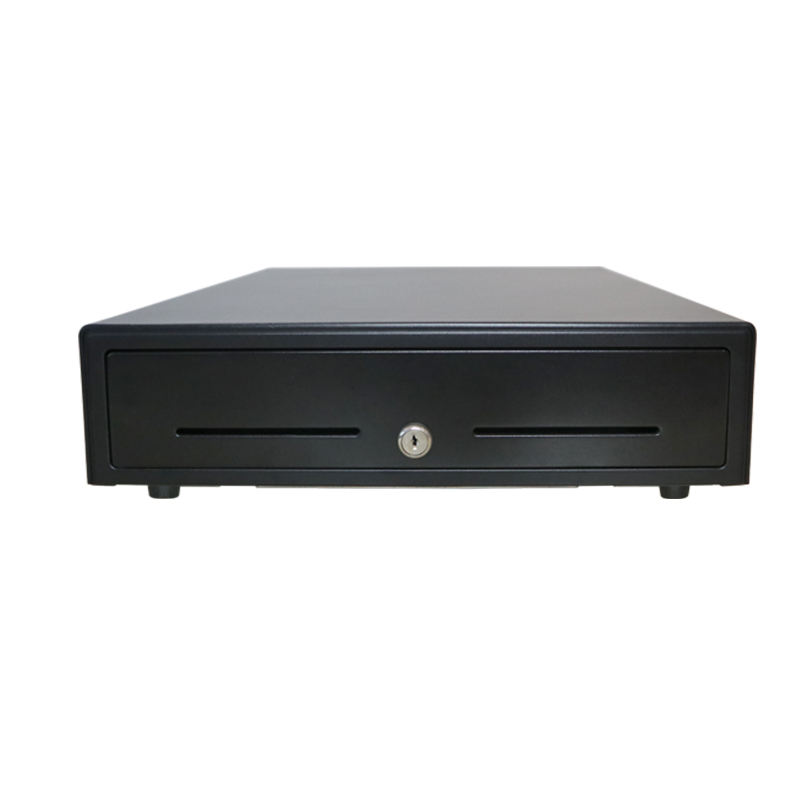
The solenoid fired and the latch did not clear. Check the lock position first, then look for a coin or folded note under the till insert, then check clearance behind the drawer — a unit pressed against a back panel opens halfway and looks exactly like a weak coil.
Can I test a drawer without a printer?
Only with the right supply. A 12 V drawer needs 12 V at about 1 A, and a 24 V unit needs 24 V; feeding the wrong one either does nothing or damages the coil. The safer route is a drawer with its own USB or RS232 interface, which the POS-410A provides, or a bench supply with the current limit set to 1 A.
Will a 24 V drawer work on a 12 V printer?
It will twitch and usually not open, because it gets a quarter of its rated power. Sites run it that way for months and call the drawer unreliable. It is under-driven: the fix is the 12 V version of the same model.
How do I know if the solenoid is burnt?
Three signs, in order of certainty: an open circuit on the meter, a smell of hot varnish when the case is opened, and a brown or deformed former around the winding. A coil that has been running at four times its rated power usually shows two of the three at once.
Why does the drawer open when I print a report?
Something is sending a kick-out command that is not a sale. On some printers the self-test fires the port; on others a driver setting fires it at the end of every job. Disconnect the drawer and print the same report: if the printer still clicks at the port, the command is coming from the host.
Do all RJ11 drawer cables work?
No. The shell is the same and the conductors are not. A 6P6C drawer cable carries all six positions; a line cord often carries only the centre pair, leaving nothing on 2 and 5, and its flat conductors are sized for tens of milliamps rather than the 1 A a solenoid pulls. If a replacement came out of a box of phone spares, test it first.
Where to go next
The pairing rules and the install mistakes sit in the kick-out guide, and the mechanism itself — what is inside the case and which part fails first — is in what is inside a cash drawer. If the printer is the problem, the four checks before a support call come first, and the cash drawer range lists every model with its interface and solenoid.
Specifying the hardware? The hardware side is covered in the POS system, by counter position — where each part sits and which of them you can stop buying separately.