A Practical Buyer’s Guide for Restaurants Choosing Fast, Reliable, and Future-Ready POS Hardware
Restaurant operations have changed dramatically over the last few years.
Customers expect faster checkout. Staff need mobile ordering. Kitchens need instant ticket routing. And restaurant owners want hardware that connects with payment systems, online ordering, loyalty programs, and inventory—without creating downtime during a busy lunch rush.
That’s exactly why Android POS terminals have become the preferred choice for restaurants in 2026.
Compared with traditional Windows-based registers or locked proprietary systems, Android POS hardware gives restaurants more flexibility, faster deployment, lower hardware costs, and a wider software ecosystem.
Whether you operate a quick-service restaurant, café, full-service dining brand, food truck, or multi-location chain, choosing the right Android POS terminal matters more than ever.
This guide breaks down what restaurant operators should look for—and how to choose the best Android POS terminal for your business in 2026.
Why Restaurants Are Moving to Android POS in 2026
Five years ago, many restaurants still relied on bulky desktop POS terminals.
Today the priorities are different:
Faster order flow
Servers need tableside ordering.
Quick-service restaurants need faster line-busting.
Drive-thru teams need instant payment confirmation.
Android handheld POS devices solve all of that with mobile ordering and payment in one device.
Lower deployment cost
Traditional POS setups often require:
- desktop terminal
- external card reader
- printer
- separate customer display
- fixed wiring
Android smart POS hardware can combine multiple functions into one:
- touchscreen
- NFC payment
- receipt printing
- barcode/QR scanning
- Wi-Fi + 4G backup
That reduces both setup complexity and maintenance.
Open ecosystem flexibility
Restaurants increasingly want freedom to choose:
- POS software
- payment processor
- online ordering platform
- loyalty tools
- ERP integration
Android-based terminals offer more flexibility than closed hardware ecosystems.
That matters even more for growing restaurant groups.
The Most Important Features in a Restaurant Android POS Terminal
Not every Android POS device is restaurant-ready.
Restaurants are demanding environments.
Hardware needs to survive heat, spills, long shifts, and heavy customer traffic.
Here are the most important buying criteria.
1. Fast and Responsive Touchscreen
Restaurant staff tap thousands of times every shift.
A slow screen creates delays.
Look for:
- 10–15 inch FHD countertop display
- capacitive touchscreen
- anti-glare screen
- bright display (400+ nits)
- multi-touch response
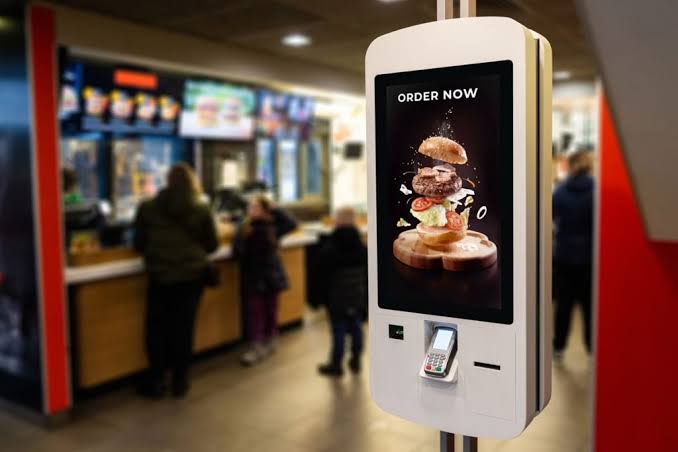
For self-order kiosks:
21–32 inch vertical screens are becoming the standard.
For handheld POS:
5–8 inch screens usually work best.
2. Built-In NFC + EMV Payment Support
Contactless payments continue growing fast.
Restaurants increasingly need support for:
- Apple Pay
- Google Pay
- tap-to-pay cards
- EMV chip cards
- QR payment
- digital wallet integration
Fast NFC processing improves customer experience and shortens checkout time.
Recent POS vendors are heavily emphasizing Android terminals with integrated NFC/EMV because restaurants increasingly expect payment + POS in a single device.
3. Restaurant-Ready Connectivity
A restaurant POS terminal should connect reliably with:
- kitchen display system (KDS)
- online ordering platforms
- barcode scanner
- receipt printer
- cash drawer
- loyalty system
- Wi-Fi network
Best practice in 2026:
- Wi-Fi 6
- Bluetooth 5+
- Ethernet support
- optional 4G/5G failover
Internet outages happen.
Restaurants need backup connectivity.
4. Battery Life for Handheld POS
For handheld restaurant POS:
battery matters.
Ideal:
- 5000mAh+
- 8–12 hours real usage
- fast charging
- optional charging dock
For busy restaurants:
hot-swap battery support is a big advantage.
5. Durability for Restaurant Environments
Real restaurant conditions include:
- steam
- oil
- water splash
- accidental drops
- high-frequency usage
Recommended:
- IP54+
- reinforced frame
- industrial-grade touchscreen
- stable thermal printer
- heat-resistant enclosure
Restaurant POS hardware is infrastructure.
Cheap hardware often becomes expensive later.
Best Android POS Terminal Types for Restaurants
Different restaurant models need different hardware.
Countertop POS Terminal
Best for:
- cashier stations
- cafés
- bakery
- front counter
Typical setup:
- 15.6 inch main screen
- optional customer-facing display
- NFC payment
- receipt printer
- cash drawer connection
DCA POS offers Android countertop POS configurations designed for restaurant counters and cashier environments, especially for brands that want OEM/ODM customization with their own software ecosystem.
Handheld Android POS
Best for:
- tableside ordering
- QSR
- delivery counter
- food trucks
- queue management
Typical features:
- Android OS
- barcode scanner
- printer
- NFC payment
- camera
- 4G
A recent Android POS buyer guide also highlights handheld devices as one of the fastest-growing categories in hospitality.
Self-Service Kiosk
Best for:
- fast food
- self-ordering
- high-volume restaurant
- chain stores
Benefits:
- shorter queue
- fewer order errors
- larger average order value
- upsell automation
Restaurants continue investing heavily in kiosk hardware because ordering behavior has permanently shifted toward self-service.
How DCA POS Fits Restaurant Projects
For restaurant operators, software companies, and POS distributors, hardware flexibility matters.
DCA POS focuses on Android smart POS hardware for:
- restaurant POS terminals
- handheld Android POS
- kiosk terminals
- payment-ready smart terminals
- industrial Android hardware
- OEM / ODM customization
That matters when you need:
Custom branding
Your own:
- logo
- packaging
- firmware customization
Hardware flexibility
Choose:
- countertop POS
- mobile handheld
- kiosk hardware
Software compatibility
Integrate with:
- restaurant POS platform
- payment gateway
- SaaS ordering system
- ERP
Global deployment
Useful for:
- POS software providers
- hospitality distributors
- restaurant chain rollout
For B2B buyers, that flexibility is usually more valuable than buying locked hardware tied to one payment processor.
Common Buying Mistakes Restaurants Should Avoid
Buying only based on price
Lowest price often means:
- weak printer
- unstable Wi-Fi
- poor battery
- higher failure rate
Ignoring restaurant workflow
Ask:
Do servers need tableside ordering?
Do customers self-order?
Need kitchen routing?
Need queue-busting?
Hardware should fit workflow.
Getting locked into proprietary processing
Closed systems may look cheap upfront.
Long-term fees can be expensive.
Android open hardware often gives more negotiating power.
No backup connectivity
A restaurant POS without internet backup creates revenue risk.
4G backup matters.
Final Thoughts
The best Android POS terminal for restaurants in 2026 depends on your workflow.
For counter service:
choose reliable countertop Android POS.
For mobile service:
choose handheld Android POS.
For QSR:
choose kiosk + mobile ordering.
For growing restaurant brands:
choose flexible Android hardware that supports your software and future expansion.
Restaurants don’t just need a payment device anymore.
They need connected hardware that improves speed, reduces errors, and scales with the business.
That’s why Android POS continues becoming the standard.
And for businesses looking for flexible restaurant POS hardware with OEM/ODM options, DCA POS offers practical Android-based solutions designed for modern restaurant operations.