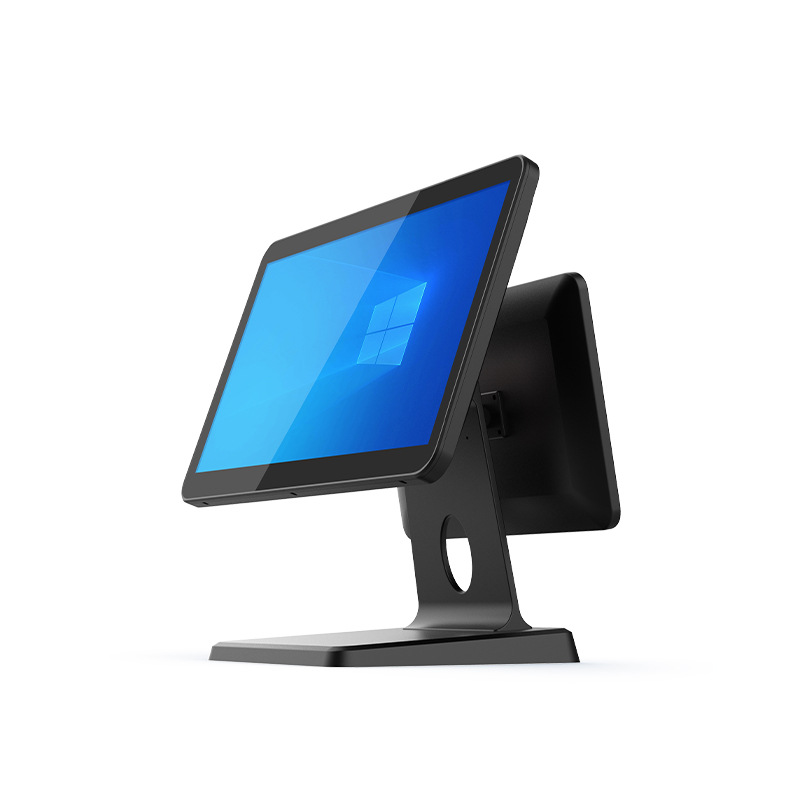
Restaurant checkout has changed a lot in recent years.
Customers expect faster payment.
Staff need efficient order entry.
Restaurants increasingly rely on digital workflows for dine-in, takeaway, loyalty programs, and QR payment.
Because of that, more restaurants are moving from traditional single-screen POS systems to dual-screen restaurant POS terminals.
A dual-screen setup improves customer interaction during checkout and helps restaurants create a faster and more organized workflow.
For restaurant owners, POS software companies, and hardware distributors, dual-screen Android POS terminals have become one of the most practical POS hardware options in 2026.
In this guide, we’ll explain how dual-screen restaurant POS terminals work, why restaurants choose them, and how to select the right model for your project.
What Is a Restaurant POS Terminal with Dual Screen?
A restaurant POS terminal with dual screen includes:
- Main screen for staff
- Second screen facing the customer
The front display is used by restaurant staff for:
- order entry
- table management
- discounts
- payment processing
- kitchen ticket management
The customer-facing display is used for:
- order confirmation
- QR payment
- loyalty membership
- digital receipt
- promotional messages
- signature confirmation
Both screens work together during checkout.
This makes ordering more interactive and reduces confusion.
Why Restaurants Are Choosing Dual-Screen POS Terminals
A single screen works.
But restaurants often benefit from better visibility and smoother customer interaction.
A dual-screen POS terminal improves:
- checkout speed
- order accuracy
- customer experience
- staff workflow
- payment efficiency
During peak hours, small improvements matter.
Even a few seconds saved per transaction adds up quickly.
For busy restaurants, that makes a noticeable difference.
Key Benefits of a Dual-Screen Restaurant POS Terminal
1. Better Order Accuracy
Restaurant orders often include details like:
- table number
- combo options
- drink size
- add-ons
- special requests
- loyalty discounts
A customer-facing screen helps guests confirm details before payment.
For example:
- no onion
- extra cheese
- less ice
- dessert combo
This reduces mistakes.
Fewer mistakes means fewer remakes.
That improves operational efficiency.
2. Faster Payment Experience
Modern restaurants increasingly accept:
- QR code payment
- NFC tap
- Apple Pay
- Google Pay
- credit card
With a dual-screen POS terminal, customers can immediately view:
- total bill
- payment QR code
- order summary
- loyalty points
This speeds up checkout.
Especially during lunch rush or dinner peak.
3. Better Customer Engagement
A second screen can also display:
- promotions
- loyalty rewards
- membership registration
- combo suggestions
- new product launches
Example:
A restaurant may promote:
- lunch combo upgrade
- dessert add-on
- weekend special
- loyalty points offer
That creates extra sales opportunities without slowing checkout.
4. Improved Staff Workflow
Restaurant staff stay focused on operations.
They don’t need to turn the screen or explain every detail.
The customer sees the order directly.
Staff can continue:
- entering orders
- confirming payment
- sending tickets to kitchen
Workflow becomes smoother.
5. More Professional Counter Setup
A dual-screen terminal also improves visual presentation.
For:
- chain restaurants
- cafés
- bubble tea stores
- quick-service restaurants
a clean checkout counter helps reinforce brand image.
For restaurants planning multiple stores, consistency matters.
Which Restaurants Benefit Most from Dual-Screen POS?
Different restaurants use dual-screen systems in different ways.
Quick-Service Restaurants
QSR locations often need:
- fast ordering
- fast payment
- queue management
- upselling
Dual screen helps speed up customer interaction.
Especially at peak lunch hours.
Coffee Shops and Cafés
Useful for:
- loyalty confirmation
- pastry upselling
- digital payment
- order review
Customers can confirm:
- oat milk
- iced / hot
- bakery combo
before payment.
Bubble Tea Shops
Very useful for:
- sugar level
- ice level
- topping confirmation
- QR payment
Drink customization becomes clearer.
Order errors become lower.
Full-Service Restaurants
Counter checkout and takeaway counters often benefit from:
- faster payment
- loyalty signup
- digital receipt
- customer-facing billing
Key Features to Compare Before Buying
Before choosing a restaurant POS terminal with dual screen, compare these.
Screen Size
Common setup:
- 10-inch + customer screen
- 15-inch + customer screen
Choose based on:
- counter size
- restaurant traffic
- ordering complexity
Large screens are useful.
But compact layout often matters more.
Android OS Compatibility
Android POS systems are popular because they offer:
- flexible software deployment
- OTA update
- SDK integration
- easier customization
For software companies, Android reduces development complexity.
Connectivity
Restaurant POS usually needs:
- USB
- Ethernet
- Bluetooth
- Wi-Fi
- printer connection
- customer display support
Reliable ports matter.
Especially during busy hours.
Touchscreen Quality
Staff touch POS screens constantly.
Customers also interact with the second display.
Good touchscreen response matters every day.
Long-Term Stability
Restaurants often run:
10–14 hours daily.
POS hardware should stay stable with:
- repeated touch
- warm environment
- constant checkout
Commercial-grade hardware matters.
Dual-Screen POS vs Single-Screen POS
Quick comparison:
| Feature | Dual Screen POS | Single Screen POS |
|---|---|---|
| Customer order visibility | yes | limited |
| QR payment display | easy | limited |
| Promotions | yes | no |
| Order confirmation | better | standard |
| Counter appearance | more premium | basic |
| Hardware cost | higher | lower |
Both work.
But dual-screen POS often creates a better restaurant checkout experience.
How Much Does a Dual-Screen Restaurant POS Terminal Cost?
Typical range:
| Type | Estimated Price |
|---|---|
| Compact dual-screen POS | $280–$450 |
| 15-inch dual-screen POS | $350–$700 |
| customized OEM POS | depends on project |
Pricing depends on:
- screen size
- CPU platform
- Android version
- payment module
- branding
- accessories
For restaurant groups and software companies, long-term stability often matters more than the lowest price.
FAQ
What is a dual-screen restaurant POS terminal?
A POS terminal with one screen for staff and one screen facing customers.
Is dual-screen POS worth it for restaurants?
For many restaurants, yes.
It improves order accuracy and payment speed.
Can dual-screen POS support QR payment?
Yes.
Most Android restaurant POS systems support QR payment and customer-facing display.
Is dual-screen POS good for cafés?
Yes.
Especially for loyalty and upsell during checkout.
Final Thoughts
Restaurants are becoming more digital.
Customers expect fast checkout.
Staff need efficient workflows.
A restaurant POS terminal with dual screen helps both.
For many restaurants in 2026, dual-screen POS offers:
- faster checkout
- better customer interaction
- improved order accuracy
- more upsell opportunities
- stronger brand presentation
Choosing the right POS hardware early helps restaurants scale more efficiently.
Looking for Dual-Screen Restaurant POS Hardware?
DCAPOS provides Android POS terminals for:
- restaurants
- cafés
- bubble tea shops
- QSR brands
- POS software companies
- distributors
Available support includes:
- OEM / ODM customization
- logo branding
- Android firmware customization
- SDK support
- fast sample delivery
- global shipping
Contact our team to discuss your dual-screen restaurant POS project.