A customer display is the screen that faces the customer across the counter. It shows the price of the item being scanned, the running total, and at the end the amount to pay. Its job is not decoration: it removes the most common dispute at a till, which is a customer who did not see what was rung up.
There are two families of device, and the difference between them decides how much work the purchase is. A command-driven display — VFD or pole LCD — receives text over a serial or USB link and needs no operating system support. An HDMI display is a second monitor: it needs a video output, a desktop, and software that knows how to put a window on the second screen.
Two families that look alike and are not
Both sit on a pole behind the till and both show the total. What is behind the glass is completely different.
| Command-driven display | HDMI / VGA second screen | |
|---|---|---|
| What it is | A character display with its own controller | A monitor |
| Driven by | ESC/POS, CD5220, AEDEX, UTC or vendor command sets | The operating system’s display output |
| Data path | RS-232, USB, USB-HID, Bluetooth or Wi-Fi | HDMI or VGA cable from the terminal |
| What you can show | Two lines of 20 characters, plus a few modes | Anything the software can draw |
| Who supports it | The POS application, usually with a driver setting | The terminal OS and the app’s window handling |
| Fails when | The command set or baud rate is wrong | The GPU has no second output, or the app opens on screen one |
The practical split is maintenance. A command-driven display is a peripheral: plug it in, set the protocol, forget it. A second screen is a display output — and on an Android terminal with a single HDMI port, driving one means the till application has to render a customer view to a display the OS does not treat as a monitor in the usual way.
Readability is character height, not screen size
“10-inch customer display” sounds more legible than “2 × 20 characters”. It is not, necessarily. A VFD sets type in millimetres and a pole LCD sets it in pixels, and the default pixel size is usually smaller than the character it replaces.
A VFD character is 9.0 × 5.25 mm on the VFD220 and 9.02 × 5.25 mm on the PD220V-II, built from a 5 × 7 dot matrix. A 10.1-inch 1280 × 800 panel gives 0.1695 mm per pixel across its 216.96 mm active width, so a 24-pixel text row is 4.1 mm tall — less than half the apparent height of the VFD character at the same distance. To match it, the application has to set that panel’s text at about 53 pixels.
The one setting that gets missed
Pole LCD units are usually shipped with the application’s default font, which is sized for a desktop monitor half a metre away. On a counter, the customer reads from 1.2 to 1.8 m. If the first thing a customer does is lean in to read the total, the display is installed and the type size is wrong — no hardware change needed, just a font setting in the POS application.
The VFD: two lines that survive a bright room
A vacuum fluorescent display is a glass tube with phosphor segments, driven as a character matrix. The VFD220 is 2 lines by 20 characters, with a 188 × 40 mm viewing window, 200 cd/m² of brightness, 20 code pages and 96 alphanumeric characters, on 5 V / 1 A. Rated life is 40,000 hours mean time between failures.
What it is good at: legibility in daylight, a wide readable angle, and 20 characters that are big enough to read from where the customer stands. What it cannot do: show a logo, a rotating promotion, or anything other than text. A VFD is also blue-green or green by nature — the colour is the phosphor, not a setting.
The PD220V-II is the same idea with different firmware: 40 characters over two lines, 500 to 1,000 cd/m², a wider command set including LD220, AEDEX, UTC and DSP800 emulations, 30,000 hours, and a pole that extends from 155 to 415 mm so the screen can sit above a tall till stack.
The pole LCD: more space, and a mounting decision
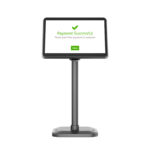
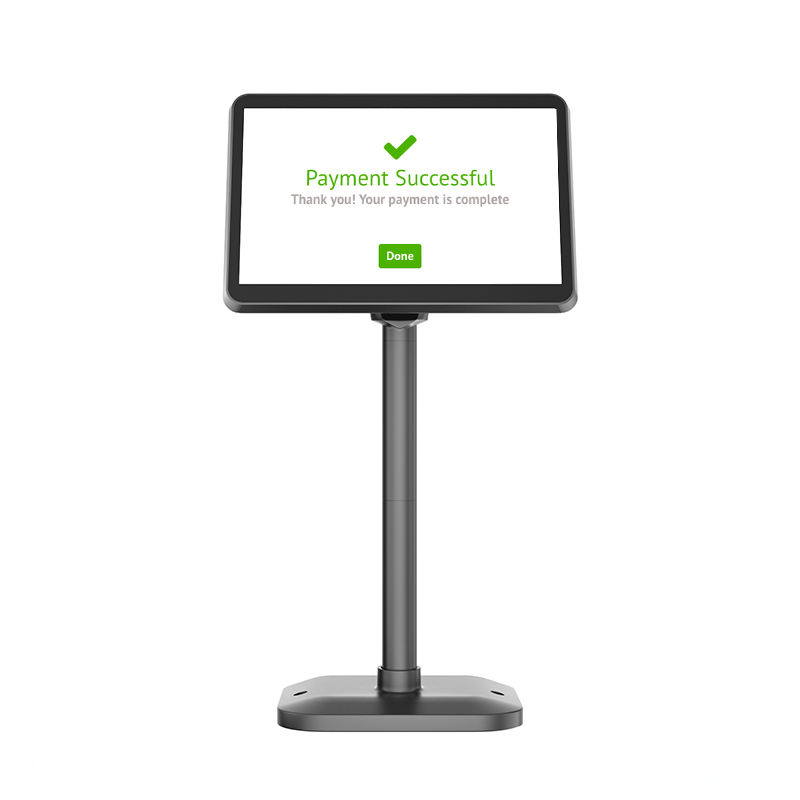
A pole LCD is a small IPS panel on an articulating arm. The 7-inch POS-CD7A is 1024 × 600 at 430 cd/m² over VGA or HDMI, in a plastic case, with 25 ms response. The 10.1-inch POS-CD10H is 1280 × 800 with a 216.96 × 135.6 mm active area, 430 cd/m², 800:1 contrast, over HDMI, on 12 V / 3 A.
Both rotate: 350 degrees horizontally on the CD10H, 60 degrees vertically, which matters where the customer stands beside the till rather than in front of it. Cable lengths are part of the specification too — 1.5 m for the display cable and 2 m for power on the CD10H, which is enough for a counter and not enough for a counter plus a cable tray.
Brightness is the number to check against the room. 430 cd/m² is comfortable indoors and washes out in direct sun; a counter facing a shop window needs either a hood or a VFD, which does not wash out because it emits rather than reflects.
What decides the choice
Four questions, in this order:
- Does the POS application support the display’s command set? If not, a command-driven unit is an unread peripheral and an HDMI panel becomes the only option.
- How far away does the customer stand? Under a metre, a pole LCD with a large font is fine; across a counter with a queue, the 9 mm VFD character wins.
- Is the counter in daylight? A VFD reads in sun; an LCD needs 400 cd/m² or more and still struggles.
- Is there a second video output? If the terminal has one HDMI port and it is in use, a second screen is not an option without a splitter.
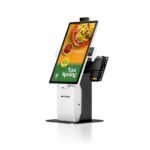
In practice most counters take the VFD for price and total, and larger self-service or quick-service sites take the LCD because they want to show the order as it is built, not just the last item.
Where customer displays go wrong
- Protocol mismatch. The display is set to CD5220 and the POS sends ESC/POS, so it shows garbage or nothing. Both ends have to name the same emulation and the same baud rate — 9600 on the PD220V-II unless it has been changed.
- Pole height. A display set at 155 mm sits below a tall till stack and behind the printer; the customer sees the pole, not the screen. The PD220V-II extends to 415 mm for this reason.
- Font size. Covered above: the default is sized for a desk, not a counter.
- Power. 5 V / 1 A for the VFD and 12 V / 3 A for the 10-inch LCD are not interchangeable adapters, and the VFD will not run from a USB port on the terminal.
What to put on the purchase order
Five lines, and the first one is the only one that matters:
- The command set the POS application can send, and the baud rate it uses.
- Character size or panel resolution, and the distance the customer reads from.
- Interface: RS-232, USB, Bluetooth, Wi-Fi — or HDMI if it is a second screen.
- Mounting: pole height range, and whether the arm has to rotate towards a side counter.
- Power: adapter voltage and whether one is included.
FAQ
What is a customer display used for?
Showing the item price, the running total and the amount due to the customer across the counter. On larger LCD units it also shows the order as it is assembled, or a promotion between sales. Its practical value is dispute reduction: the customer saw the price at the moment it was rung up.
What is the difference between a VFD and a pole LCD?
A VFD is a character display — 2 lines of 20 characters, 9 mm characters, self-illuminating and readable in daylight. A pole LCD is a small monitor, typically 7 or 10.1 inches, driven by commands or by HDMI. The VFD wins on legibility and simplicity; the LCD wins on how much it can show.
Can I use a normal monitor as a customer display?
Yes, if the terminal has a spare video output and the POS application can render to a second screen. That is a different integration from a customer display: the app has to manage two windows, and on many Android terminals the second output is not available to applications the way a desktop OS exposes it.
Why does my customer display show strange characters?
Almost always a protocol or baud-rate mismatch. The display is emulating one command set — CD5220, ESC/POS, AEDEX, UTC — and receiving another. Set both ends to the same emulation and the same baud rate before assuming the unit is faulty.
Is a customer display required by law?
Not in general retail. Some jurisdictions require the customer to be able to see the amount charged, and some payment schemes require a displayed total at the point of card entry — which is usually satisfied by the card terminal’s own screen rather than by the POS display.
Where to go next
A customer display is a legibility decision, not a screen-size decision. Pick the command set first, then the character height, then the pole.
customer displays and card readers VFD220, 2 × 20 characters POS-CD10H, 10.1-inch pole LCD POS-CD7A, 7-inch LCD where the display fits in a POS system