When customers purchase a commercial POS terminal, they expect it to work reliably from day one—and continue performing for years in demanding environments.
However, ensuring long-term reliability requires far more than simply assembling hardware and installing software.
Before a POS terminal leaves the factory, it goes through a comprehensive testing and validation process designed to identify potential failures and ensure stable performance.
At DCAPOS, reliability testing is a critical part of our manufacturing philosophy.
In this article, we’ll take you inside our testing process and explain how we verify the quality and reliability of every commercial POS terminal before shipment.
Why Reliability Testing Matters
Unlike consumer tablets, commercial POS systems often operate:
- 12 to 24 hours per day
- Seven days a week
- In restaurants with heat and grease
- In retail stores with continuous transactions
- In industrial environments with dust and vibration
A hardware failure can result in:
- Interrupted business operations
- Lost sales
- Customer dissatisfaction
- Higher maintenance costs
- Expensive on-site support
This is why commercial POS terminals require far more rigorous testing than ordinary consumer electronics.
Our Reliability Testing Philosophy
At DCAPOS, we follow a simple principle:
Defects should be found inside the factory—not at the customer’s location.
Our testing process focuses on three objectives:
- Verify product functionality
- Identify early component failures
- Simulate real-world operating conditions
Every production batch undergoes multiple stages of inspection and testing before shipment approval.
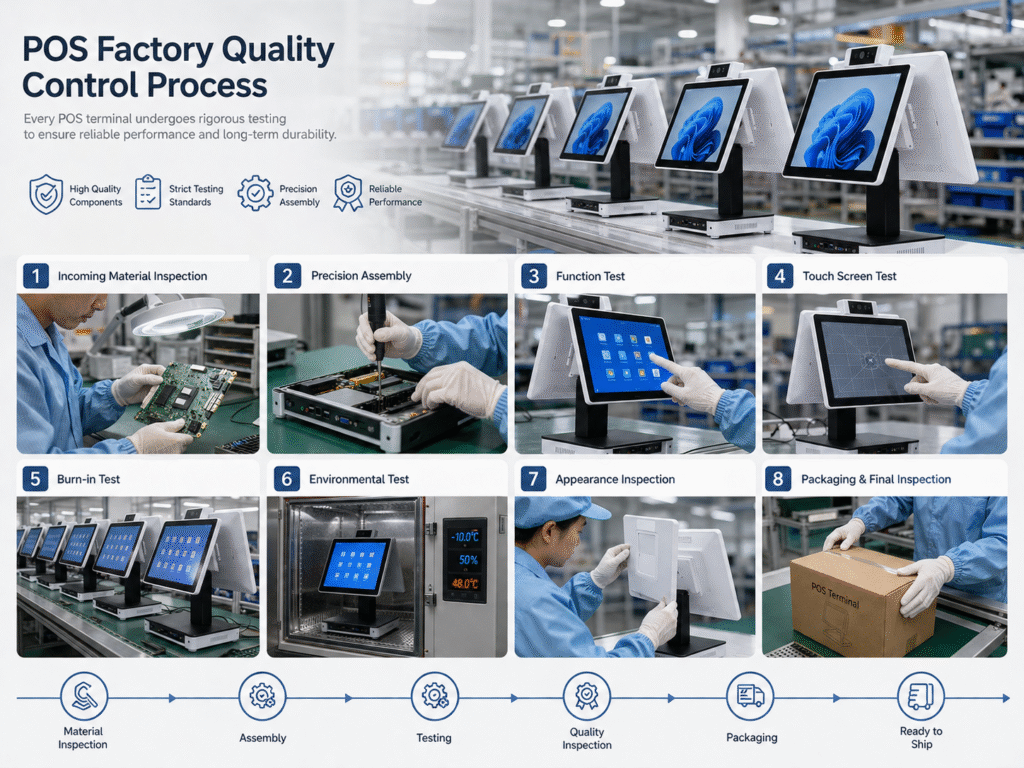
Step 1: 100% Functional Testing
Every assembled POS terminal undergoes a complete functional inspection.
No unit skips this process.
Our engineers verify:
Touchscreen Function
- Multi-touch response
- Edge accuracy
- Touch sensitivity
- Gesture performance
Display Performance
- Brightness
- Color consistency
- Dead pixels
- Backlight stability
Peripheral Interfaces
Every interface is tested:
- USB
- LAN
- HDMI
- Serial ports
- Audio ports
- Cash drawer interface
Wireless Connectivity
Verify:
- Wi-Fi stability
- Bluetooth functionality
- NFC operation (if equipped)
Only products that pass all functional tests move to the next stage.
Step 2: System Stability Testing
Hardware performance depends heavily on software stability.
Our engineers verify:
- Android boot performance
- Application compatibility
- Memory usage
- Network communication
- Device sleep and wake functions
- Peripheral drivers
The objective is to ensure stable operation under long-term use.
Step 3: Burn-In Testing (Aging Test)
One of the most important tests for commercial electronics is the aging test.
After assembly, POS terminals operate continuously for extended periods.
Typical aging durations include:
- 8 hours
- 24 hours
- 48 hours
- 72 hours for selected projects
During the burn-in process, the system continuously performs:
- Boot cycles
- Display operation
- Touch interactions
- Network communication
- Peripheral testing
Burn-in testing helps identify early component failures before products reach customers.
Why Burn-In Testing Matters
Industry data shows that many electronic failures occur during the initial operating period.
By operating products continuously inside the factory, we can significantly reduce early-life failures in the field.
This process improves:
- Product reliability
- Customer satisfaction
- Long-term stability
- Lower RMA rates
Step 4: Touchscreen Reliability Testing
The touchscreen is one of the most frequently used components of a POS terminal.
Commercial environments may generate thousands of touches every day.
To verify durability, we perform:
Touch Accuracy Tests
Measure response precision across the entire screen.
Continuous Touch Simulation
Automated equipment simulates repeated touch operations.
Multi-Touch Testing
Verifies simultaneous touch functionality.
Reliable touch performance is essential for cashier efficiency.
Step 5: USB and Interface Durability Testing
Commercial POS systems frequently connect and disconnect peripherals such as:
- Barcode scanners
- Receipt printers
- Payment terminals
- Customer displays
To verify mechanical durability, interfaces undergo repeated insertion testing.
These tests help ensure long-term connector reliability.
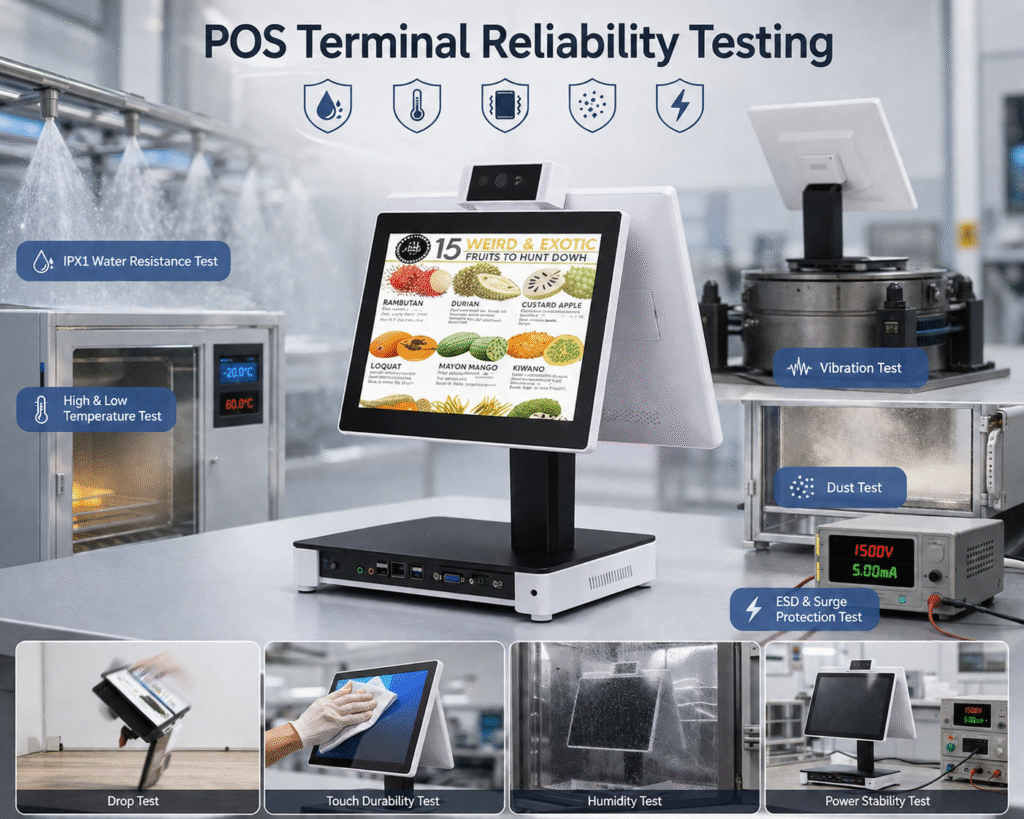
Step 6: Environmental Testing
Commercial POS systems are deployed worldwide.
Environmental conditions vary significantly.
Our testing may include:
High-Temperature Testing
Simulates operation in hot environments.
Typical applications:
- Restaurants
- Kitchens
- Tropical regions
Low-Temperature Testing
Verifies startup and performance in cold environments.
Humidity Testing
Evaluates long-term reliability in humid environments.
Thermal Cycle Testing
Repeated heating and cooling cycles help identify material stress and potential failures.
Environmental testing improves product robustness.
Step 7: Continuous Operation Testing
Commercial POS systems often remain powered on throughout the day.
To verify long-term stability, systems operate continuously while performing:
- Application execution
- Network communication
- Touch interaction
- Peripheral operations
The goal is to identify:
- System crashes
- Memory leaks
- Thermal issues
- Software instability
Step 8: Transportation Simulation Testing
A reliable product must also survive shipping.
Tests may include:
Vibration Testing
Simulates transportation conditions.
Drop Testing
Evaluates packaging protection.
Carton Compression Testing
Ensures packaging integrity during shipping.
These tests reduce the risk of shipping-related damage.
Step 9: Final Quality Control (FQC)
After reliability testing, every product undergoes final inspection.
Our inspectors verify:
Product Appearance
- Scratches
- Cosmetic defects
- Screen quality
- Logo printing
Configuration Verification
- CPU
- Memory
- Storage
- Firmware version
- Accessories
Label Verification
- Serial number
- Product labels
- Regulatory labels
Only products that pass FQC can proceed to packaging.
Step 10: Outgoing Quality Control (OQC)
Before shipment, random samples from each batch undergo additional inspections.
This final verification includes:
- Packaging quality
- Product functionality
- Documentation
- Shipping labels
- Accessory completeness
Only after OQC approval are products released for shipment.
Why Testing Matters for OEM and ODM Projects
For software companies and system integrators, hardware reliability directly impacts:
- Customer satisfaction
- Service costs
- Brand reputation
- Project success
A structured reliability testing process significantly reduces field failures and support costs.
Choosing a manufacturer with mature testing capabilities is often just as important as selecting the hardware specifications themselves.
Reliability Is Built Into Every Product
At DCAPOS, we believe reliable hardware is not achieved by luck.
It is the result of:
- Standardized testing procedures
- Engineering discipline
- Continuous improvement
- Attention to detail
Every test is designed with one objective:
Deliver commercial POS hardware that customers can trust.
Final Thoughts
Commercial POS terminals operate in demanding environments where reliability is critical.
Before every POS terminal leaves our factory, it undergoes multiple stages of functional verification, environmental testing, aging tests, and quality inspections.
These processes help ensure:
- Stable operation
- Long service life
- Lower failure rates
- Better customer experience
- Reduced maintenance costs
Because in commercial environments, reliability is not just a feature—it is a requirement.